Piotr VassevPiotr Vassev

How to Scrape LinkedIn Video Transcripts and Post Data

How to Scrape LinkedIn Video Transcripts

If you want to scrape LinkedIn video transcripts for content research, competitor analysis, or feeding an AI pipeline, this guide walks you through the whole process. You will learn how to turn any public LinkedIn video into clean, timestamped, searchable text — with the full post context attached — and what to do with that text once you have it.

Why Scrape LinkedIn Video Transcripts?

LinkedIn spent the last few years pushing video hard, and it worked. Founders post talking-head clips instead of text posts. Companies publish customer stories, product walkthroughs and conference recaps natively rather than linking to YouTube. Some of the most substantive messaging on the platform now lives in video.

And essentially none of it is searchable.

LinkedIn offers no transcript download, no caption file, and no API that returns spoken text. A post's text field usually carries a one-line hook — the actual argument, the actual claim, the actual product detail is spoken aloud in a clip that no text-based tool can read. Every social listening dashboard, every competitor tracker, every "what is this company saying" analysis silently skips it.

That is a strange gap, because the video is the part with the highest information density. A 90-second clip contains roughly 250 spoken words — several times the length of the caption above it, and far more specific.

Transcription closes the gap. Once the audio is text, LinkedIn video becomes just another corpus: greppable, embeddable, summarizable, comparable across accounts and over time.

Teams scrape LinkedIn video transcripts for a range of purposes:

  • Competitor messaging analysis — what a rival's leadership actually claims on camera, in their own words
  • Content research — which topics, hooks and formats a niche's top posters use, at the sentence level
  • Sales and prospect intelligence — what a target account's executives are publicly saying about their priorities
  • AI and RAG pipelines — a clean text corpus of industry commentary to embed and query
  • Repurposing your own back catalogue — turn every video you have posted into blog drafts, clips and captions
  • Accessibility and archiving — a durable, readable record of video that LinkedIn itself does not preserve as text

Doing this by hand means watching every video and typing what you hear. That is the definition of an automation target.

What Data You Can Extract from LinkedIn Videos

Each post comes back as one structured record — the transcript plus everything that gives it context.

FieldDescriptionExample
activityId / postUrlPost identifier and direct link on LinkedIn7494187339938729985
postedAtPublish timestamp2026-08-15T00:24:57Z
discoveredViaWhich profile or company page the post came fromcompany/ted-conferences
authorName / authorUrlWho posted it, with a link to their pageTED Conferences
authorFollowersAudience size at scrape time24,535,750
headline / textThe post's opening line and full body copyWhat if your creativity came from...
likeCount / commentCountEngagement on the post680 / 29
hasVideo / videoUrl / videoQualityWhether the post carries video and its direct media linktrue / mp4-360p-30fp-crf28
thumbnailUrl / durationSecondsCover image and clip length129.92
transcriptFull spoken text, punctuated and formattedAncient Greece and ancient Rome...
transcriptLanguage / transcriptConfidenceDetected language and model confidenceen / 0.994
transcriptParagraphsTimestamped segments with text, start, end, speakerstart 0.08 → end 3.44, speaker 0
commentsFull comment thread, when enabledauthor, date, text, likes

The pairing is what makes this useful. A transcript on its own is a wall of text. A transcript attached to an author with 24 million followers, a publish date, a like count and a comment thread is a data point you can rank, filter and correlate.

Timestamped paragraphs, not just a blob

transcriptParagraphs segments the transcript into { text, start, end, speaker } entries. That is the difference between "we have the words" and "we can act on the words":

  • Jump straight to the moment a specific claim is made
  • Cut clips programmatically around a quote
  • Generate subtitle files
  • Chunk sensibly for embedding — paragraph boundaries beat arbitrary character windows for RAG quality

Common Use Cases for LinkedIn Transcript Data

Competitor Messaging Analysis

Run the scraper against a competitor's company page and their executives' profiles on a schedule. Within a month you have a corpus of everything they have said on camera. Search it for product names, pricing language, customer claims, or the objections they keep pre-empting — that last one tells you exactly what their sales team is hearing.

Content Research and Hook Mining

Pull the top posters in a niche, then correlate the opening 15 seconds of each transcript against likeCount and commentCount. Hooks are the most copied and least documented part of the format. The transcript's first paragraph is the hook, timestamped and isolated.

Sales and Account Intelligence

Before a call, pull every video an account's leadership has posted this quarter. What they say publicly about priorities, hiring, expansion, or a painful migration is qualification signal that no CRM enrichment vendor sells, because none of them read video.

Pair this with LinkedIn company data for firmographics and decision maker discovery for the names worth listening to.

AI Pipelines and RAG

Transcripts are near-ideal LLM input: conversational, opinionated, dated, and attributable. Embed the paragraphs, keep postUrl, authorName and postedAt as metadata, and you have a queryable index of what an industry is actually saying — with a citation for every answer.

Repurposing Your Own Content

Point it at your own profile. Every video you have posted becomes a blog draft, a newsletter section, a set of pull-quotes and a subtitle track. The most efficient content you can produce is content you already made.

Trend and Language Tracking

Run the same account list weekly and track term frequency over time. When a phrase — a category name, a competitor, a compliance deadline — starts appearing in spoken content across a niche, you have caught a narrative shift while it is still forming.

Challenges of Doing This Manually

Before the tutorial, it is worth being clear about why this is awkward to build in-house:

  • No transcript exists to fetch — unlike YouTube, there is no caption track to download. You must resolve the media file and run real speech-to-text
  • Video URLs are ephemeral and signed — LinkedIn's dms.licdn.com links carry expiry parameters and multiple quality renditions; picking the right one and using it before it expires is fiddly
  • Post data lives in a different shape than the video — author, follower count, engagement and media details come from different parts of the payload and have to be reassembled per post
  • Transcription costs money and needs guarding — a naive pipeline transcribes the same reposted video repeatedly, or burns budget on a 15-minute clip you did not want
  • Rate limits — LinkedIn caps how many posts one IP can read, so any real volume needs proxy rotation
  • Personal data obligations — post authors are individuals and spoken content is their words; a compliant pipeline needs minimization and deletion handling from day one
  • Maintenance — LinkedIn's frontend changes regularly, and each change breaks an unmaintained scraper

For most teams, a maintained actor is more practical than owning that stack.

Step-by-Step: How to Scrape LinkedIn Video Transcripts

Here is how to do it using the LinkedIn Video Transcript Scraper on Apify.

Step 1 — Choose Your Input

The scraper takes two kinds of input, and you can mix them in one run:

  • Profiles or company pages — e.g. https://www.linkedin.com/company/ted-conferences/ or a member profile URL. Their recent posts are collected automatically and every video among them is transcribed
  • Specific post URLs/posts/ links, /feed/update/ links, or a bare activity ID, for when you already know exactly what you want

Company pages tend to be more reliable to collect from than member profiles, so start there if you have the choice.

Step 2 — Configure the Run

Head to the LinkedIn Video Transcript Scraper and set your options:

  1. Add your URLs to profileUrls and/or postUrls
  2. Set maxResults to cap the number of posts returned (default 20) — this is your cost control
  3. Leave onlyVideoPosts on so you never pay for posts with nothing to transcribe
  4. Turn on includeOlderPosts to reach past the handful shown on a member profile page
  5. Turn on includeComments if you want the discussion as well as the video
  6. Leave language on automatic unless detection is misreading a specific accent

Example input for tracking a company page:

{
  "profileUrls": ["https://www.linkedin.com/company/ted-conferences/"],
  "onlyVideoPosts": true,
  "includeComments": false,
  "language": "auto",
  "maxResults": 20
}

And for transcribing a specific set of posts:

{
  "postUrls": [
    "https://www.linkedin.com/feed/update/urn:li:activity:7494187339938729985/"
  ],
  "includeComments": true,
  "maxResults": 10
}

Step 3 — Run the Scraper

Once started, the actor will:

  • Resolve each profile or company page into its recent posts, newest first
  • Skip posts with no video (unless you turned that off)
  • Pick the best available video rendition and pull the audio
  • Transcribe it with automatic language detection, punctuation and smart formatting
  • Segment the result into timestamped paragraphs with speaker labels
  • Attach the full post context — author, follower count, copy, engagement, thumbnail, duration
  • Optionally collect the comment thread
  • Stop cleanly at your maxResults cap

Step 4 — Export Your Results

  • JSON — the right choice here, since transcriptParagraphs and comments are nested arrays
  • CSV / Excel — fine if you only need the flat transcript text and post metadata
  • API — pull results programmatically via the Apify API
  • Integrations — push straight to Google Sheets, Make, Zapier, or Slack

Ready to try it? Run the LinkedIn Video Transcript Scraper on Apify and get your first transcripts in minutes.

Example Output (Real Data Preview)

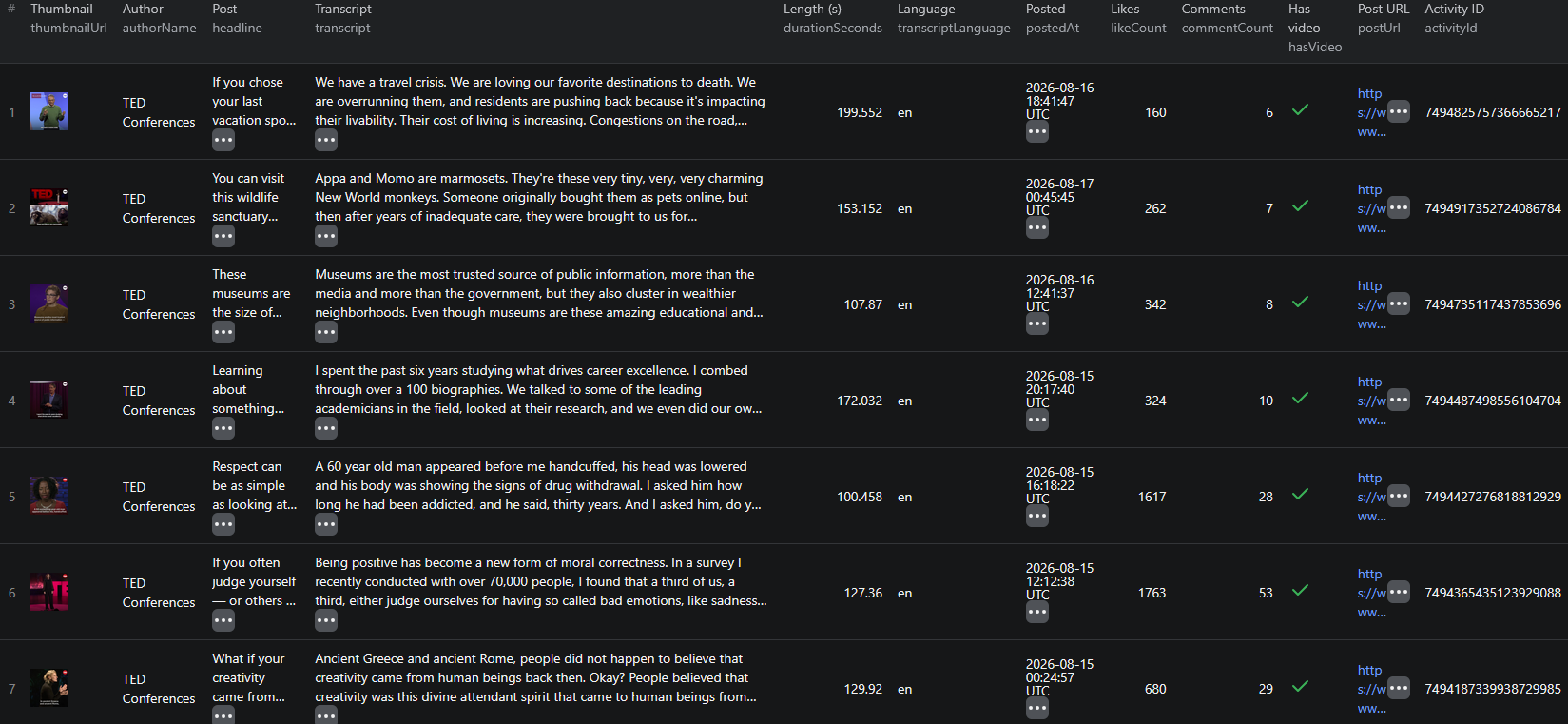
LinkedIn video transcript scraper results

Here is a real record, trimmed for length:

{
  "activityId": "7494187339938729985",
  "postUrl": "https://www.linkedin.com/feed/update/urn:li:activity:7494187339938729985/",
  "postedAt": "2026-08-15T00:24:57.084Z",
  "discoveredVia": "company/ted-conferences",
  "authorName": "TED Conferences",
  "authorUrl": "https://www.linkedin.com/company/ted-conferences",
  "authorFollowers": 24535750,
  "headline": "What if your creativity came from something other than yourself?",
  "text": "What if your creativity came from something other than yourself? “Eat, Pray, Love” author Elizabeth Gilbert explores a different way to think about your artistic “genius”: http://t.ted.com/gAI7McG",
  "likeCount": 680,
  "commentCount": 29,
  "hasVideo": true,
  "videoUrl": "https://dms.licdn.com/playlist/vid/v2/D4E10AQEvoVJYM5MJTw/mp4-360p-30fp-crf28/...",
  "videoQuality": "mp4-360p-30fp-crf28",
  "thumbnailUrl": "https://media.licdn.com/dms/image/v2/D4E10AQEvoVJYM5MJTw/videocover-high/...",
  "durationSeconds": 129.92,
  "transcript": "Ancient Greece and ancient Rome, people did not happen to believe that creativity came from human beings back then. People believed that creativity was this divine attendant spirit that came to human beings from some distant and unknowable source...",
  "transcriptLanguage": "en",
  "transcriptConfidence": 0.994,
  "transcriptParagraphs": [
    {
      "text": "Ancient Greece and ancient Rome, people did not happen to believe that creativity came from human beings back then.",
      "start": 0.08,
      "end": 6.72,
      "speaker": 0
    }
  ]
}

Key things to notice:

  • The transcript is many times longer than the caption — the post text here is a two-line teaser; the spoken content is roughly 300 words of actual argument. That ratio is typical, and it is the whole reason this dataset exists
  • transcriptConfidence is a usable filter — clear speech scores above 0.95. Heavy background music or crosstalk scores lower, so gate on this before feeding an LLM
  • durationSeconds is fractional — bill estimation rounds up per started minute, so a 129.92-second clip costs three transcription minutes, not two
  • authorFollowers is a point-in-time snapshot — useful for weighting reach, but it is the value at scrape time, not at post time
  • discoveredVia survives reposts — you always know which page surfaced the post, which matters when one account's timeline carries another's content
  • transcriptParagraphs is your chunking boundary — do not re-split the transcript by character count when the model already gave you semantic segments with timestamps

Try the LinkedIn Video Transcript Scraper now — no coding required.

Automating LinkedIn Transcript Collection

Scheduled Runs

This actor is designed for monitoring, not backfilling. Around 10 recent posts are reachable per page (plus roughly 36 older ones on member profiles with includeOlderPosts), so the way to build a deep archive is to run weekly against a fixed account list and let it accumulate. A year of weekly runs gives you a corpus nobody can reconstruct after the fact — LinkedIn does not let you page back through it later.

Deduplicate on activityId and you will never store or pay for the same post twice.

API Integration

Use the Apify API to trigger runs and collect results programmatically:

  • Push transcripts into a vector database for semantic search
  • Summarize each new video with an LLM and post the summary to Slack
  • Append rows to a competitor-messaging sheet automatically
  • Chain into your CRM so account records carry what executives said last month

Node.js Example

For a complete working example showing how to call this actor from Node.js — including confidence filtering and turning transcriptParagraphs into ready-to-embed chunks — see the GitHub repository.

Webhooks

Fire a webhook on run completion so summarization, embedding and alerting kick off the moment new transcripts land.

Using LinkedIn Transcript Data for Business Intelligence

Message Tracking Over Time

Tokenize transcripts by month and track how a company's spoken vocabulary shifts. Positioning changes show up in speech long before they show up on the website — someone tries a new phrase on camera months before marketing commits to it.

Claim Extraction

Run an LLM over each transcript with a fixed extraction schema — product claims, customer names, metrics quoted, competitors mentioned. You end up with a structured claims table built from unstructured speech, which is exactly the kind of dataset competitive intelligence teams normally assemble by hand.

Engagement Correlation

Join transcript features against likeCount and commentCount, normalized by authorFollowers. Does clip length correlate with engagement? Does the presence of a number in the first 15 seconds? These are answerable questions once video is text, and unanswerable before.

Speaker and Format Analysis

transcriptParagraphs carries a speaker index, so you can separate monologue clips from interviews and two-person formats. Format effectiveness is usually studied by eye; here it is a groupby.

Multilingual Coverage

With automatic detection across 20+ languages, one run over a regional account list gives you comparable text for markets you do not staff. Translate downstream and the analysis is identical to your home market's.

Does LinkedIn Provide an API for This?

Not for this. LinkedIn's Marketing and Community Management APIs are partner programs, gated behind an application process, scoped to content you own or advertise on. There is no public endpoint that returns another account's posts, and there is certainly none that returns the spoken content of a video.

What's Available

  • Partner APIs exist for managing your own pages and ad accounts
  • Approval is required, and access is granted per use case
  • No transcript, caption or speech-to-text surface exists at all
  • No bulk export of another account's video content is offered

What That Means

Scraping is not an alternative to an API here — there is no API to be an alternative to. Everything the actor reads is rendered publicly for any visitor: the post, the author, the engagement counts and the video itself. The transcription step happens on your side, from a public media file.

The LinkedIn Video Transcript Scraper reads that public surface and returns it as structured records with the transcript normalized into text and timestamped paragraphs.

Pricing — Pay Only for Results

The actor uses Apify's Pay-Per-Event pricing model, so you pay for what you actually get back.

EventWhen it's chargedPrice
Actor startOnce per run$0.00005
postPer post returned, with all its metadata$0.005
transcriptOnce per video turned into text$0.008
transcript-minutePer started minute of audio$0.008
commentsPer post, only when comments are enabled$0.003

Quick cost estimates:

  • A typical sub-minute video → $0.021 per post, about $2.10 per 100 videos
  • The 130-second TED clip above → $0.037 (post + transcript + 3 started minutes)
  • A weekly monitor over 10 accounts, ~5 videos each → roughly $1.05 per week

Three things keep the bill honest: posts without video are skipped by default and never charged, videos containing no speech at all are not charged for transcription, and maxResults caps every run. New Apify accounts include free monthly usage credits, so you can validate the output before spending anything.

Try the LinkedIn Video Transcript Scraper

The LinkedIn Video Transcript Scraper turns LinkedIn's least accessible content type into structured text — full AI transcripts with timestamps and detected language, plus author, follower count, post copy, publish date, engagement and optional comments.

What you get:

  • Full transcripts of every public LinkedIn video, punctuated and formatted
  • Timestamped paragraphs with speaker labels — ready for clipping, subtitling or embedding
  • Complete post context on every record, so transcripts are analyzable, not just readable
  • Automatic language detection across 20+ languages
  • Profile, company page and direct post URL inputs
  • No login, no cookies, no session management
  • Pay-Per-Event pricing — about $2.10 per 100 short videos, and nothing for posts without video
  • Scheduled runs, webhooks, and API access

Start transcribing LinkedIn videos now — your first run takes less than 5 minutes to set up.

Doing the same on other platforms? See how to scrape X (Twitter) video transcripts, or work through the news and social media scraping guide for the wider picture.

Legal and Ethical Considerations

Video transcripts are people's words, so this dataset warrants more care than a product feed. Read this before building a pipeline.

  • Public data only — the actor reads posts visible to any logged-out visitor. No login, no cookies, no connection-only content
  • Transcripts are personal data — a named individual's spoken words, attached to their profile URL, are personal data under GDPR, UK GDPR, CCPA and similar regimes. You need a lawful basis to collect and process them
  • Purpose matters — analyzing a company's public messaging is a materially different purpose from building profiles of individuals. The first is ordinary competitive research; the second attracts obligations you probably do not want
  • Collect only what you need — if you are tracking messaging themes, you may not need author names at all. Aggregate analysis carries far less risk than a personal-data archive and usually answers the question just as well
  • Build deletion in from day one — if someone asks to be removed from your dataset, you need to be able to do it. Retrofitting that is painful
  • Transcripts are not verbatim-perfect — speech-to-text makes mistakes. Never quote a transcript publicly as an exact statement without checking the source video; use transcriptConfidence as a first filter
  • Respect the platform's terms — you are responsible for using the data in compliance with LinkedIn's Terms of Service and applicable law
  • Do not republish wholesale — a transcript is a derivative of someone's creative work. Analysis, search and summarization are fair uses of your own copy; reposting full transcripts as content is not

Public messaging is fair to study. The person who spoke it still has rights over how you process their identity. Treating those two things differently is the whole of doing this responsibly.

Frequently Asked Questions

Can you get a transcript from a LinkedIn video?

Not from LinkedIn itself. LinkedIn shows auto-captions on some videos in the player but offers no transcript download, no caption file and no API endpoint that returns spoken text. The only route is to fetch the video's media URL from the post and run it through speech-to-text, which is exactly what the LinkedIn Video Transcript Scraper does — returning clean punctuated text with timestamped paragraphs alongside the post data.

Do I need a LinkedIn account or cookies to scrape video transcripts?

No. The scraper reads only publicly visible posts, so there is no login, no session cookie and nothing to configure. That also means it sees what a logged-out visitor sees: public posts from member profiles and company pages, not connection-only content.

How many posts can I get per LinkedIn profile?

Around 10 recent posts are available per profile or company page, plus roughly 36 older ones when Include older posts is enabled (member profiles only). The actor is built to monitor accounts over time rather than backfill an entire posting history in one run — schedule it weekly and the archive builds itself.

How much does it cost to transcribe LinkedIn videos?

The actor uses Pay-Per-Event pricing: $0.005 per post scraped, $0.008 per video transcribed, and $0.008 per started minute of audio. Most LinkedIn videos run under a minute, so a typical transcribed post costs about $0.021 — roughly $2.10 per 100 videos. Posts without video are skipped and never charged.

What languages does the transcription support?

Automatic language detection covers 20+ languages including English, Spanish, Portuguese, French, German, Italian, Dutch, Polish, Hindi, Japanese, Korean, Chinese, Russian, Turkish, Swedish, Danish, Norwegian, Ukrainian and Indonesian. Leave the language option on automatic unless detection is getting a specific accent or dialect wrong, in which case pin it explicitly.

Is scraping LinkedIn video content legal?

The scraper collects only publicly available post data — no login, no private content. Post authors are identifiable individuals, though, so names, profile URLs and the spoken content of their videos are personal data under GDPR and similar regimes. You need a lawful basis for collecting and processing them, and you remain responsible for complying with LinkedIn's Terms of Service.

About the Author

This guide was written by Piotr, a software engineer with hands-on experience building and maintaining web scrapers at scale. He develops and maintains a suite of data extraction tools on the Apify platform, helping businesses automate their data collection workflows.

Need help with your scraping project?

Book a free discovery call and let's scope your project together.

Book a Call
Piotr Vassev

Piotr Vassev

Founder of FalconScrape. Building production-grade web scraping systems and data automation pipelines for businesses worldwide.

Connect on LinkedIn