
How to Search 1688 by Image and Shortlist Suppliers
A product photo is often easier to start with than a Chinese search term. But a visual match alone does not tell you whether a supplier sells the right variant, at the right quantity, on workable terms.
Our 1688 Image Search Scraper takes a public product-image URL and returns similar 1688 offers. Each row can include a CNY price, visual similarity score, orders, repurchase rate, supplier name and location, and a sponsored-placement flag. It does not return minimum order quantities or quantity price tiers. Treat the matches as a shortlist to inspect, not ready-to-buy quotes.
Try one photo first
Open the Actor on Apify. An Actor is a tool you run on Apify; you can use its Input form without writing code. Add a product photo under Image URLs, set Max matches per image to 30, leave Exclude sponsored offers off so you can see the flag, and click Start. Open the run's Dataset when it finishes.
Or switch the Input form to JSON and paste this small test using the Actor's example photo:
{
  "imageUrls": [
    "https://cbu01.alicdn.com/img/ibank/O1CN01ImHZo51sn2AJ4qBDw_!!2009745810-0-cib.jpg"
  ],
  "maxResultsPerImage": 30,
  "excludeSponsored": false
}
The image URL was reachable when this guide was written, but source-hosted photos can move. Replace it with your own public JPEG, PNG, WebP, GIF, or AVIF URL of up to 10 MB. A base64 data: URL also works. maxResultsPerImage applies to each photo, not the whole run. Leave Proxy configuration at its default for the first test.
Our Actor documentation includes this abbreviated example match:
{
  "rank": 2,
  "offerId": "947521574275",
  "price": 1.4,
  "currency": "CNY",
  "similarityScore": 0.43,
  "ordersCount": 1356,
  "repurchaseRatePercent": 58,
  "companyName": "永康市勃斯工贸有限公司",
  "city": "金华市",
  "isSponsored": false
}
This is a documentation example, not a claimed result from the 30-match input above. Titles, supplier names, and locations appear as 1688 provides them, usually in Chinese. Prices are in CNY.
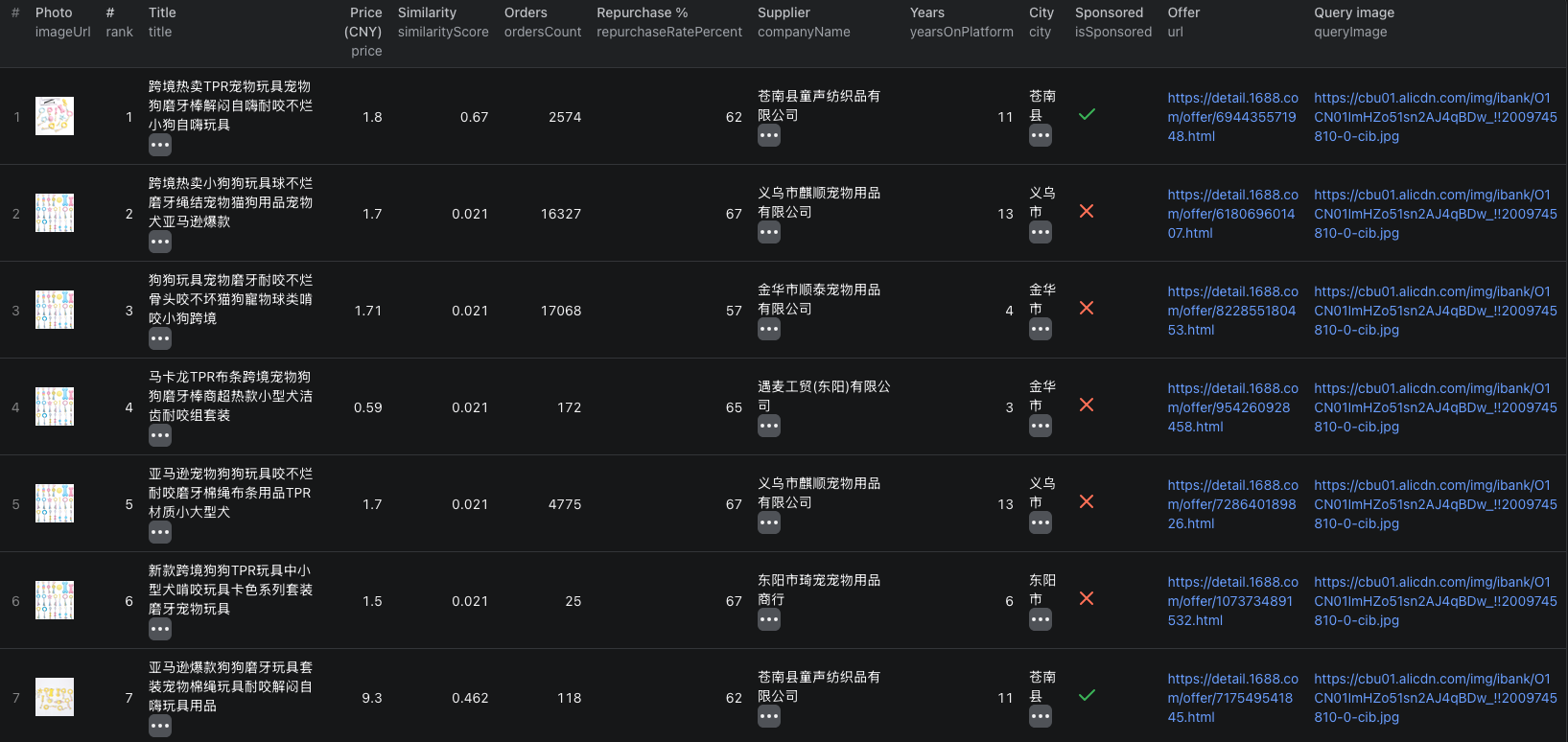
This screenshot shows seven visible matches from a separate image-search run. The price is in CNY, and the similarity and sponsored columns help narrow the list before opening an offer.
The 1688 image-search Node.js example runs the same one-photo input with apify-client and reads the dataset.
Turn visual matches into a supplier shortlist
Export the Dataset as CSV or JSON. Keep queryImage, offerId, and url so each candidate stays tied to the photo and source offer. Then:
- Look at the product image and title. A high similarity score is useful, but it does not prove the size, material, or variant matches.
- Separate sponsored rows using
isSponsoredif you want to inspect organic results first. - Compare CNY prices alongside
ordersCount,repurchaseRatePercent, and supplier details. These are signals for further checks, not proof of quality or stock. - Open the best offers and check MOQ, quantity-based pricing, specifications, shipping, and current availability before contacting suppliers.
For structured offer details, pass the shortlisted offerId values to our 1688 Listings Scraper guide. Do not compare the image-search headline price with a landed cost or a price for a different order quantity.
If an image cannot be downloaded or decoded, the dataset can contain an image_error row. A photo with no matches can produce no_matches. Neither is a product offer. Try a clear product photo or a working public URL before raising the result limit.
Pricing
Pricing as of October 4, 2026 is $0.02 per image that returns matches, covering its first page of up to 60 results, plus $0.01 for each additional results page of up to 60. An Actor-start event costs $0.00005 per GB of allocated memory, minimum one event. At the default 1 GB, one photo returning up to 30 matches on its first page would cost $0.02005 in Actor events. Failed images and no-match images do not incur the image-search fee, but the start event still applies. See live pricing before a larger batch.
Frequently asked questions
Do I need a 1688 account to search by image?
No. Our Actor searches public 1688 image results without a 1688 login. You need an Apify account to run it.
Does maxResultsPerImage apply to the whole run?
No. maxResultsPerImage caps returned matches for each input photo separately. Each image is searched and billed separately when it returns matches.
Can image-search results tell me the minimum order quantity?
No. Use the offer ID or URL to inspect the product page, or pass shortlisted offers to our 1688 Listings Scraper for MOQ and quantity-price details.
