How to Check Google Keyword Search Volume in Bulk
A keyword list is easier to prioritize when you can see demand, seasonality, and paid-search cost together. Our Google Keyword Volume Scraper takes a list of terms and returns average monthly Google searches, 12 months of volume history, CPC, Google Ads competition, and top-of-page bid estimates for each term with data. You choose the country and, if needed, the language. No Google Ads account is required.
The competition field is advertiser competition, not an organic ranking-difficulty score. Use it to understand the paid market, not to conclude that a page will be easy or hard to rank.
Check a small list first
Open the Actor on Apify. An Actor is a tool you run on Apify; no code is needed for this step. In Keywords, enter these three terms, one per line. Set Country to us and Max results to 3, then click Start. You can leave Language blank to use the country's main language.
Or switch the Input form to JSON and paste:
{
  "keywords": [
    "running shoes",
    "trail running shoes",
    "running shoes for flat feet"
  ],
  "country": "us",
  "maxItems": 3
}
When the run finishes, open its Dataset. Each returned row represents one keyword with search data. The fields to compare first are searchVolume, cpc, competition, and monthlySearches. Export the dataset as CSV if you want to sort it in a spreadsheet, or JSON if you are joining it to another workflow.
Our Actor documentation shows this abbreviated historical output for a different term:
{
  "keyword": "web scraping",
  "country": "us",
  "language": "en",
  "searchVolume": 9900,
  "cpc": 14.12,
  "competition": "LOW",
  "competitionIndex": 22,
  "lowTopOfPageBid": 2.98,
  "highTopOfPageBid": 13.35,
  "monthlySearches": [
    { "month": "2025-09", "searchVolume": 12100 }
  ]
}
The monthlySearches array is shortened here; a complete row has 12 months. These historical values are an example of the output shape, not current volume estimates for the three-keyword input above.
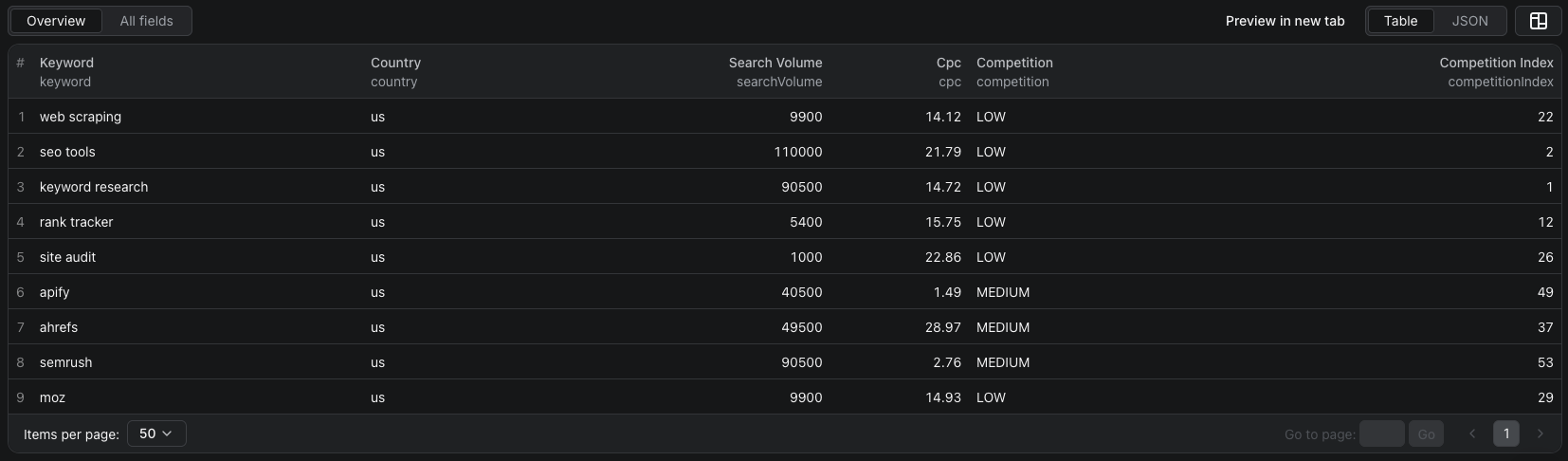
This screenshot shows a separate nine-keyword US run, not the three running-shoe terms in the starter input. The Overview table makes it easy to compare volume and paid-search metrics before exporting the full dataset.
The Google keyword volume Node.js example runs the three-keyword starter input with apify-client and reads the dataset.
Turn the export into a shortlist
Start with terms relevant to the page you can actually make. Among those, compare searchVolume for broad demand and monthlySearches for seasonal spikes. CPC and bid ranges can help indicate the paid-search market, but they do not prove a keyword will convert for your business. Open a few promising search results yourself before committing to a content brief.
If a term is missing, check the run's status message. Google may not have volume data for that keyword in the selected country; a missing row does not mean zero searches. Duplicates are checked once. For larger lists, the Actor sends up to 1,000 keywords per lookup, and maxItems limits the total keywords checked in the run.
Pricing
Pricing as of October 15, 2026 is $0.003 per keyword with data, plus $0.10 per lookup of up to 1,000 keywords. The Actor-start event is $0.00005 per GB of allocated memory, minimum one event. With the default 256 MB memory, if all three keywords above return data, Actor events would total $0.10905. A keyword with no data has no per-keyword charge, but the lookup fee still applies. See live pricing before running a larger list.
Frequently asked questions
Is the competition field an organic SEO difficulty score?
No. It measures competition among Google Ads advertisers, not how hard it is to rank in organic search.
What happens when Google has no data for a keyword?
The Actor omits that keyword from the dataset and lists it in the run status message. The keyword-with-data event is not charged for it, but the batch lookup fee still applies.
Can I check more than 1,000 keywords?
Yes. The Actor splits the list into lookups of up to 1,000 keywords each. Set Max results high enough for your list; each lookup has its own batch fee.