How to Find Twitch Streamers by Game and Build a Shortlist
If you are looking for streamers in a particular category, a follower count alone is a poor shortlist. You also need to know who is live now, what they are streaming, how many people are watching, and whether they have a public way to get in touch.
Our Twitch Channel Scraper can collect channels by username, keyword, or game. For a game, it returns channels live in that category at the time of the run, with profile details, live viewers, recent stream information, and public links. It does not tell you a creator's typical audience from one snapshot, and an email appears only when the creator has put one in their public bio or panels.

Find 20 live channels in one category
Open the Actor on Apify. An Actor is a tool you run on Apify; you can use its Input form without writing code. Add Fortnite under Games / categories (live channels), add en under Stream languages, and set Max items to 20. Leave Videos (VODs) per channel and Clips per channel at 0 for this first pass. Click Start, then open the run's Dataset.
Or switch the Input form to JSON and paste:
{
  "games": ["Fortnite"],
  "languages": ["en"],
  "videosPerChannel": 0,
  "clipsPerChannel": 0,
  "maxItems": 20
}
This asks for up to 20 channel rows, not a guaranteed 20. Twitch's category view exposes up to 100 live channels per category, or up to 100 per language when languages are supplied. maxItems is a cap across channel, video, and clip rows in the whole run. It does not cap chat messages; those use Max chat messages per video if you request a chat replay separately.
Our Actor documentation includes this abbreviated channel row from a direct-username lookup:
{
  "type": "channel",
  "login": "pokimane",
  "followers": 9443737,
  "isLive": false,
  "viewers": null,
  "lastStreamAt": "2026-09-28T20:38:29.567135Z",
  "emails": ["teampokimane@wmeagency.com"],
  "source": "channel",
  "sourceQuery": null
}
That is a historical documentation example, not a result from the live-category input above. In a game-discovery run, keep source and sourceQuery to record how a channel was found. Viewer and follower counts change; viewers can be null when a channel is offline. An empty emails array is not proof that the creator has no contact route.
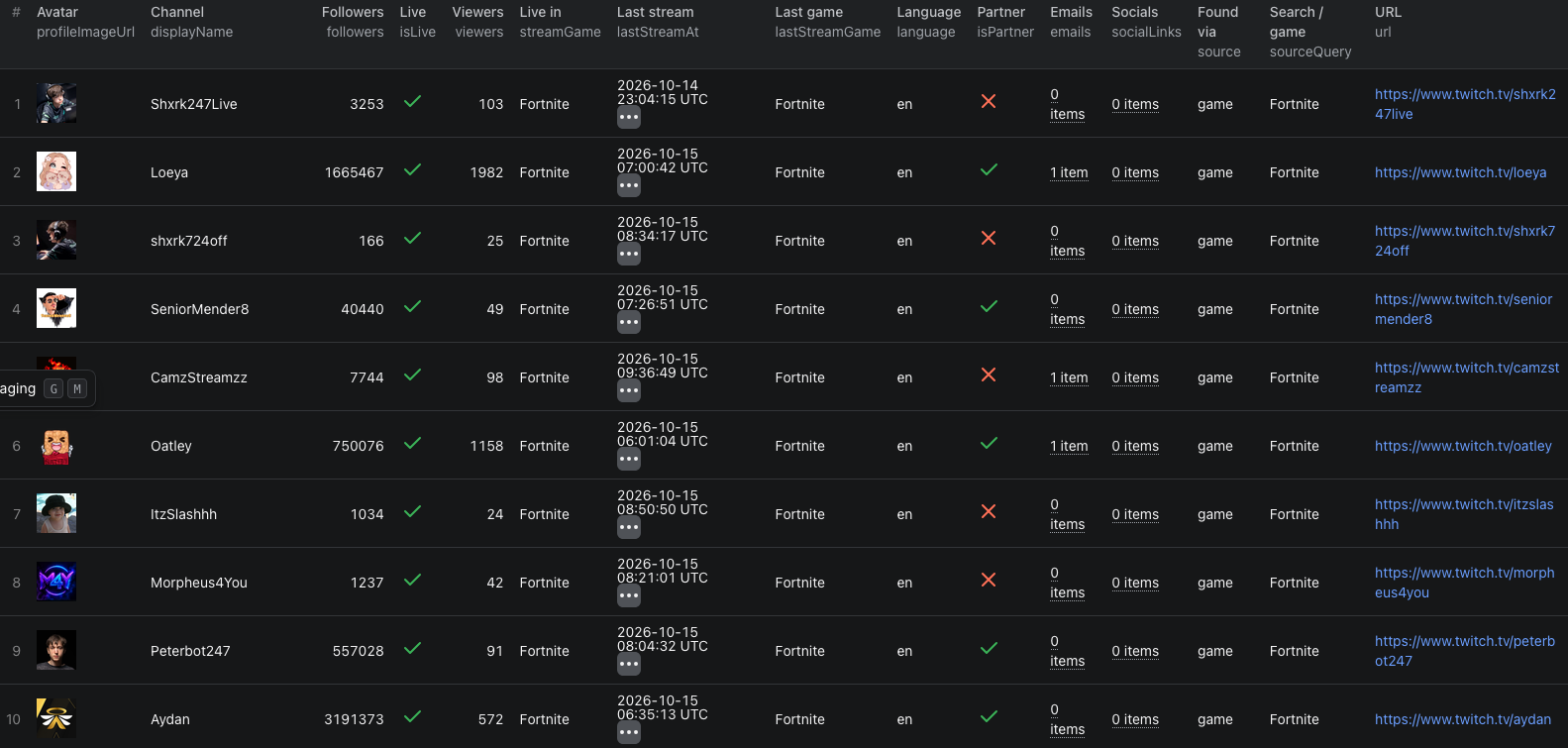
This screenshot shows ten visible channels from a Fortnite category run on October 15, 2026. All ten are marked live in the crop; viewer counts are a snapshot, and the email column shows a count rather than the addresses.
The Twitch channels Node.js example runs the same 20-channel input with apify-client and reads the dataset.
Make the shortlist useful
Export the Dataset as CSV or JSON. Keep each channel's login or url as its stable reference, alongside followers, isLive, viewers, streamGame, lastStreamAt, emails, socialLinks, and panelLinks. Then:
- Remove channels outside your campaign's language or category, and open the remaining Twitch pages to check content fit.
- Treat
viewersas a live snapshot, not an average. Run the same category search at several relevant times before comparing audience size. - Check the bio and panel links for an appropriate business contact. Use public contact details responsibly; do not assume every link is an invitation for outreach.
If you already have creator handles, enter them under Channels instead of searching a game. The Actor accepts usernames or Twitch channel URLs. For a closer content check, a later run can add a small videosPerChannel or clipsPerChannel value. Those produce separate paid rows and count toward maxItems, so raise the total cap deliberately. Chat replay is another optional input for a specific past broadcast, not part of this channel-discovery run.
Pricing
Pricing as of October 15, 2026 is $0.002 per returned channel, $0.0005 per video, $0.0005 per clip, and $0.00002 per chat message. An Actor-start event costs $0.00005 per GB of allocated memory, minimum one event. With the default 512 MB memory and the input above, 20 returned channel rows and no other rows would cost $0.04005 in Actor events. Fewer returned channels cost less; optional videos, clips, or chat add their own charges. See live pricing before expanding a run.
Frequently asked questions
Does a game search find every Twitch channel in that category?
No. It returns up to 100 channels live in the category at the time of the run. Adding language codes can return up to 100 per language.
Will every channel have a business email?
No. The Actor only returns emails it finds in a channel's public bio or panels. Check the channel's links if the email field is empty.
Does maxItems include chat messages?
No. maxItems caps channel, video, and clip rows across the run. Chat messages have a separate per-video limit.