Piotr VassevPiotr Vassev

How to Scrape Collabstr for Influencer Rates and Creator Profiles

How to Scrape Collabstr Influencer Pricing

If you want to scrape Collabstr for influencer rate benchmarking, creator discovery, or outreach list building, this guide walks you through the entire process. You will learn how to extract exact service pricing, ratings and reviews, locations, and real social handles from the marketplace — and how to turn that into the rate benchmark that influencer marketing normally lacks.

Why Scrape Collabstr Data?

Influencer pricing is the creator economy's biggest information asymmetry. Brands negotiate one creator at a time with no reference point. Creators guess what to charge. Agencies treat their rate benchmarks as proprietary, because knowing the market price is the service they sell. Ask what a mid-tier TikTok creator should get for one video and the honest answer, almost everywhere, is nobody publishes that.

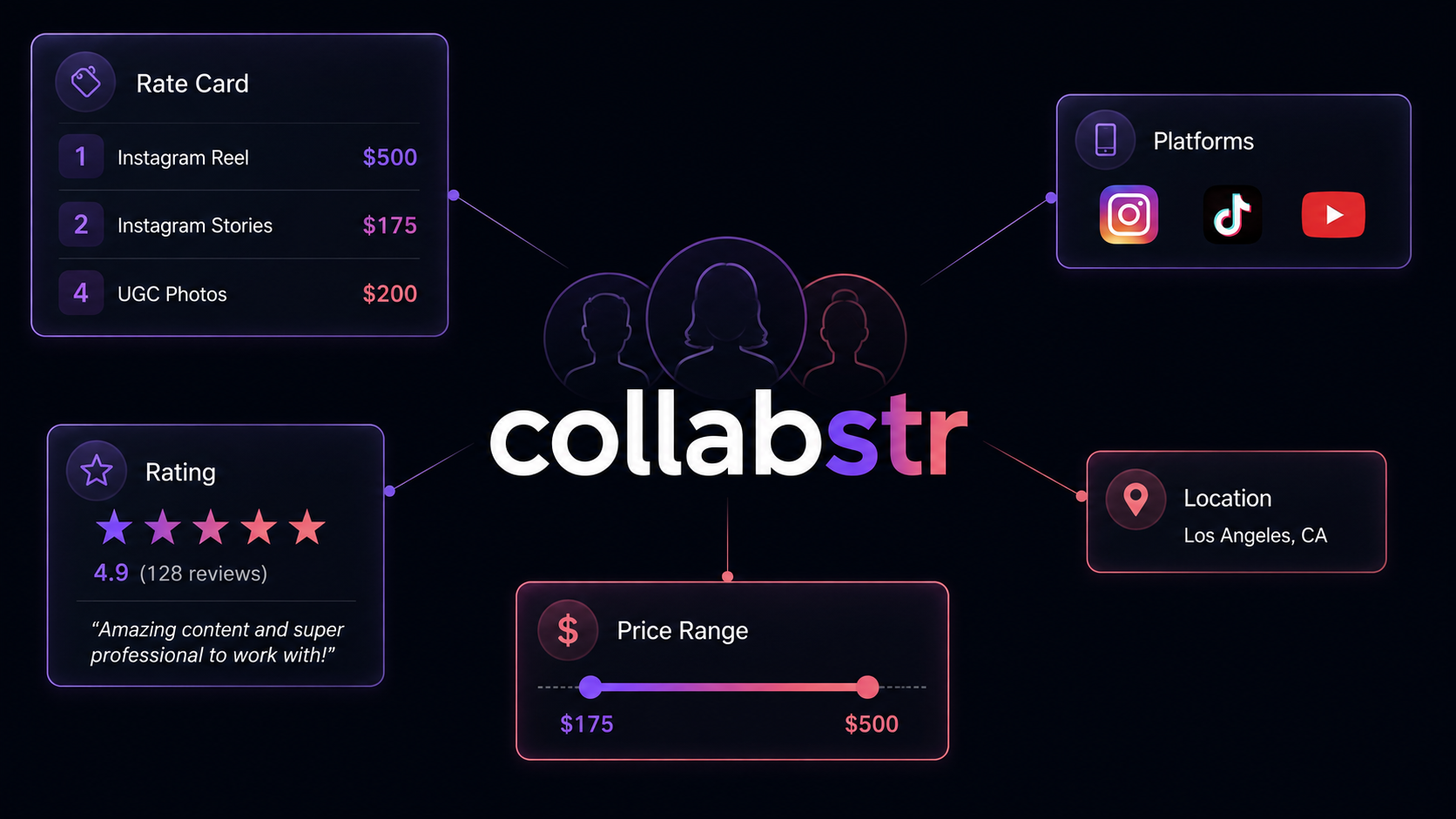
Collabstr is the exception. It is a marketplace where vetted Instagram, TikTok, YouTube, and UGC creators publish fixed prices against defined deliverables — not "contact for rates" but "1 Instagram Reel, $500." Thousands of creators, each with a public rate card, sorted into niches and locations.

Scraped in bulk, that becomes something that does not otherwise exist publicly: a rate benchmark dataset for influencer marketing.

Businesses and researchers scrape Collabstr data for a range of purposes:

  • Rate benchmarking — establish what a Reel, a Story, a TikTok video, or a UGC photo set actually costs, by niche and platform
  • Budget planning — size a campaign accurately before approaching a single creator
  • Creator discovery — build niche-specific shortlists filtered by platform, location, price band, and rating
  • Outreach list building — collect real social handles for creators who have already signalled they accept brand work
  • Competitive pricing for creators — if you are the creator, find out what comparable people in your niche charge
  • Marketplace and reputation analysis — aggregate ratings and review text to understand what buyers actually value

Doing this manually means opening hundreds of profiles and copying rate cards by hand. The pricing only becomes useful in aggregate, which makes this a natural automation target.

What Data You Can Extract from Collabstr

Each creator comes back as one structured record. These are the key fields:

FieldDescriptionExample
Name / usernameDisplay name and Collabstr profile slugShweta Rao / shweta-rao
Job titleCreator's stated roleContent Creator
BioProfile descriptionI am a fashion and skincare enthusiast...
LocationCity and countrySan Diego, CA, United States
PlatformsWhich platforms they offer services on["instagram", "ugc"]
SocialsReal Instagram / TikTok / YouTube / website linksinstagram.com/the_sixyard_saga
PackagesEvery service package with exact price and platform1 Instagram Reel — $500 (instagram)
Price low / highCheapest and most expensive package175 / 500
CurrencyCurrency of all pricesUSD
Rating / review countAverage score and how many reviews5 / 1
ReviewsIndividual reviews with author, date, score, and textDavid, 2026-04-21, 5, "Very genuine content!"
ImageProfile image URLd5ik1gor6xydq.cloudfront.net/sellers/...

The packages array is the centrepiece. Each entry pairs a deliverable with a price and a platform, which is what makes rate comparison across creators possible at all — you are comparing like for like rather than trying to interpret a single headline number.

One thing the scraper cannot give you: follower counts

Collabstr does not publish follower counts, so no scraper can extract them from it. This matters because the metric most influencer marketers actually want is cost per thousand followers, and that needs both halves.

The workaround is a two-step chain, and it works well: the scraper returns each creator's real Instagram, TikTok, and YouTube handles, so you pass those into a dedicated social scraper to resolve follower numbers, then join on the handle. You end up with rate and reach — but it is two runs, not one, and it is better to plan for that upfront.

Common Use Cases for Collabstr Data

Influencer Rate Benchmarking

The flagship use case. Sweep a niche, flatten every creator's packages array, group by deliverable type, and take the distribution. You now know that a Reel in beauty runs a median of $X with a $Y–$Z interquartile range — a number that essentially no one publishes and that both brands and creators pay agencies to estimate.

Because package names are descriptive ("2 Instagram Stories", "4 UGC Product Photos"), you can parse quantity out of them and normalize to a per-unit rate, which makes the comparison sharper still.

Campaign Budget Modelling

Once you have rate distributions per deliverable and niche, budgeting stops being guesswork. Ten Reels from mid-tier fashion creators has a computable cost with a real confidence interval, before you contact anyone.

Creator Shortlisting

Filter on platforms, location, priceLow/priceHigh, and rating to build a shortlist that already matches your brief and budget. Because everyone on Collabstr has opted into a marketplace, these are creators who accept brand work — a materially better list than one scraped from a hashtag.

Rate Setting for Creators

If you are the creator rather than the brand, the same dataset answers the question from the other side: what are comparable people in my niche, on my platform, in my region charging? Underpricing is endemic among newer creators precisely because this information is hard to find.

Reputation and Review Analysis

reviews returns author, date, rating, and full text. Aggregated across a niche, review text tells you what brands actually praise and complain about — turnaround time, communication, content quality — which is useful both for vetting creators and for understanding what buyers value.

Rate-per-Follower via Handle Chaining

Combine the pricing here with follower counts resolved from the social handles and you get the creator economy's core efficiency metric. This is the highest-value analysis available from the dataset, and it is the reason the socials field matters as much as the prices.

Challenges of Scraping Collabstr Manually

Before jumping into the tutorial, it is worth understanding what makes this awkward to build yourself:

  • Rate cards are per-profile — the pricing that makes the dataset valuable lives on individual creator pages, so listings alone are not enough. Every creator is a page visit
  • Category pages cap at 24 creators — meaningful coverage means either many category URLs or a sitemap crawl, plus deduplication across them
  • Packages are variable-length and free-text — creators name their own packages, so the structure has to be a normalized array rather than fixed columns
  • Reviews are nested records — each creator carries a variable number of reviews with their own fields, which has to be modelled as nested data
  • Social links are scattered — Instagram, TikTok, YouTube, and website links appear in different places and need consolidating into one object
  • Personal data handling — creator profiles are individuals, so a compliant pipeline needs deletion handling built in from the start rather than bolted on
  • Maintenance burden — marketplace frontends change, and each change breaks an unmaintained scraper

For most use cases, a pre-built and maintained scraper is more practical than building one in-house.

Step-by-Step: How to Scrape Collabstr

Here is how to scrape Collabstr data using the Collabstr Scraper on Apify.

Step 1 — Choose Your Start URLs

The scraper accepts three kinds of Collabstr URL, and you can mix them in one run:

  • Category or search pages — e.g. https://collabstr.com/search-influencers?c=fashion. Any filter you apply on the site is carried in the URL. Each page yields up to 24 creators
  • Individual creator profiles — e.g. https://collabstr.com/shweta-rao. Use this for tracking a specific shortlist over time
  • The sitemaphttps://collabstr.com/sitemap.xml. This is the input for whole-site coverage, and the right choice for building a rate benchmark

For a niche study, combine several category URLs. For a market-wide benchmark, use the sitemap with a maxItems cap.

Step 2 — Configure the Scraper Input

Head to the Collabstr Scraper on Apify and configure your run:

  1. Add your URLs to startUrls
  2. Set maxItems to cap the number of creator profiles (default 50; 0 for no limit) — this is your cost control, since billing is per creator
  3. Leave proxyConfiguration off unless you hit rate limits; Collabstr works fine without a proxy

Example input for a fashion-niche rate study:

{
  "startUrls": [
    { "url": "https://collabstr.com/search-influencers?c=fashion" },
    { "url": "https://collabstr.com/search-influencers?c=beauty" }
  ],
  "maxItems": 200,
  "proxyConfiguration": { "useApifyProxy": false }
}

And a market-wide sweep via the sitemap:

{
  "startUrls": [{ "url": "https://collabstr.com/sitemap.xml" }],
  "maxItems": 2000
}

Step 3 — Run the Scraper

Once started, the scraper will:

  • Expand category, search, and sitemap URLs into individual creator profile pages
  • Visit each profile and extract the full record — identity, location, platforms, and socials
  • Parse every service package into a normalized { name, price, platform } entry, and derive priceLow and priceHigh
  • Collect the rating, review count, and each individual review with its author, date, score, and text
  • Consolidate Instagram, TikTok, YouTube, and website links into a single socials object
  • Stop cleanly at your maxItems cap

Step 4 — Export Your Results

When the run finishes, export your data in the format you need:

  • JSON — best here, since packages and reviews are nested arrays that flatten poorly
  • CSV / Excel — fine for the profile-level fields; expect the nested arrays to be serialized
  • XML / HTML / RSS — useful for feeds and reporting workflows
  • API — pull results programmatically via the Apify API

Ready to try it? Run the Collabstr Scraper on Apify and get your first dataset in minutes.

Example Output (Real Data Preview)

Collabstr scraper results

Here is a complete creator record:

{
  "username": "shweta-rao",
  "profileUrl": "https://collabstr.com/shweta-rao",
  "name": "Shweta Rao",
  "handle": "@shweta-rao",
  "jobTitle": "Content Creator",
  "bio": "I am a fashion and skincare enthusiast...",
  "image": "https://d5ik1gor6xydq.cloudfront.net/sellers/1504/17072553651605594.webp",
  "location": "San Diego, CA, United States",
  "platforms": ["instagram", "ugc"],
  "socials": {
    "instagram": "https://instagram.com/the_sixyard_saga"
  },
  "rating": 5,
  "reviewCount": 1,
  "priceLow": 175,
  "priceHigh": 500,
  "currency": "USD",
  "packages": [
    { "name": "2 Instagram Stories", "price": 175, "platform": "instagram" },
    { "name": "1 Instagram Reel", "price": 500, "platform": "instagram" },
    { "name": "4 UGC Product Photos", "price": 200, "platform": "ugc" }
  ],
  "reviews": [
    { "author": "David", "date": "2026-04-21", "rating": 5, "body": "Very genuine content!" }
  ]
}

Key things to notice:

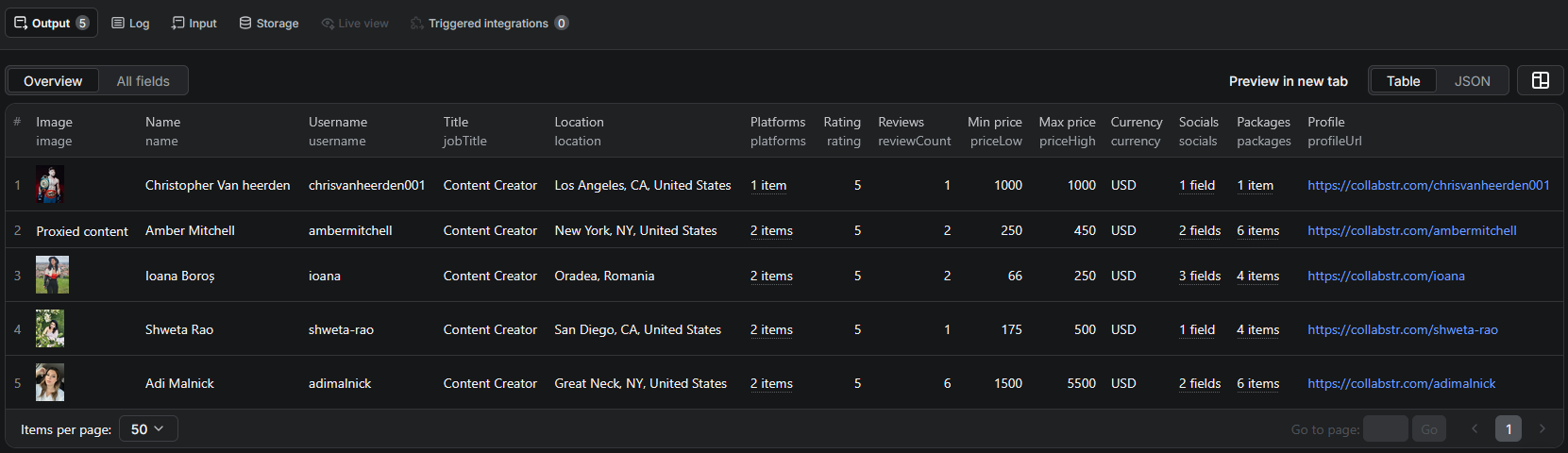
  • packages is the analytical unit, not the creator — the five creators in the screenshot above carry 1, 6, 4, 4 and 6 packages respectively: 21 price points from 5 records. Flatten this array before analysis, or your rate distribution will silently undercount by roughly four to one
  • Package names carry quantity — "2 Instagram Stories" at $175 is $87.50 per Story. Parsing the leading number turns the field into a per-unit rate and makes cross-creator comparison meaningful
  • priceLow and priceHigh are convenience fields — useful for filtering a shortlist by budget, but do not mistake them for the rate for any particular deliverable
  • socials is the join key to reach data — the Instagram handle here is the input for a follower lookup, and the handle rarely matches the Collabstr slug
  • platforms includes ugc — user-generated content with no posting attached is a distinct product with its own price band, and it is often the cheapest entry point for a brand
  • reviews is nested and variable-length — plan for JSON output rather than CSV if reviews matter to you

Try the Collabstr Scraper now — no coding required.

Automating Collabstr Data Collection

Scheduled Runs

Creator rates are sticky — they change monthly at most, not hourly. A weekly or monthly sweep is the right cadence, and over time it produces something genuinely valuable: a longitudinal record of how influencer pricing moves by niche. Nobody else is keeping that series, and it cannot be reconstructed after the fact.

For a tracked shortlist of creators, a weekly run over their profile URLs catches rate changes and new reviews cheaply.

API Integration

Use the Apify API to trigger runs programmatically and retrieve results:

  • Feed rate distributions into a campaign budgeting tool
  • Push qualified creators into your CRM or outreach sequencer
  • Chain into an Instagram or TikTok scraper to resolve follower counts and compute cost per follower
  • Connect to Zapier, Make, Google Sheets, or Slack for no-code workflows

Node.js Example

For a complete working example showing how to call this scraper from Node.js — including flattening the packages array into a per-deliverable rate table — see the GitHub repository.

Webhooks

Configure webhooks to fire when a run completes, so enrichment and outreach steps kick off as soon as new creator data lands.

Using Collabstr Data for Business Intelligence

Rate Cards by Deliverable and Niche

Flatten every packages entry across a niche into rows of { deliverable, platform, price }, normalize quantity out of the package name, and take the distribution per deliverable type. That table is the deliverable — a public rate card for influencer marketing, per niche, that you can update monthly.

Platform Price Premiums

Group by the package platform field. How much more does a TikTok video cost than an Instagram Reel? Does UGC-only work price below posted content? These are structural questions about the creator economy that this dataset answers directly.

Geographic Rate Variation

location plus package prices reveals how much creator rates vary by market. For brands running regional campaigns, or for creators deciding how to position themselves, that variation is often larger than expected.

Rating-Price Relationship

Does a higher rating command a higher price? Regress rating against normalized per-unit price within a niche. If the correlation is weak — and on marketplaces it often is — that is itself an actionable finding: reputation is underpriced, and highly rated creators are the value buy.

Cost per Thousand Followers

The chained analysis. Resolve follower counts from the socials handles, divide price by reach, and you have the metric the industry runs on. Ranking creators by cost per thousand followers rather than by absolute price is what separates efficient influencer spend from expensive spend.

Does Collabstr Provide an API?

Collabstr does not offer a public API for creator or pricing data.

What's Available

  • There is no developer program or documented endpoint for querying creators, packages, or reviews
  • The platform is built for brands to browse and book creators through the site itself
  • No bulk export or feed is published

What That Means

As with most marketplaces, scraping is not an alternative to an API here — it is the only route. Everything the scraper returns is rendered publicly for any visitor browsing the marketplace: profiles, rate cards, ratings, and reviews are the product, and they are deliberately visible so brands can evaluate creators before booking.

The Collabstr Scraper reads that public surface and returns it as structured records with the packages and reviews normalized into arrays.

Pricing — Pay Only for Results

The Collabstr Scraper uses Apify's Pay-Per-Event pricing model, billed per creator profile.

EventWhen it's chargedPrice per eventPer 1,000 creators
creator-profileEach creator scraped, including all service packages, ratings, and reviews$0.01$10.00
Actor startOnce per run, per GB of memory$0.00005negligible

Quick cost estimates:

  • The default 50-creator run → about $0.50
  • A 200-creator two-niche rate study → $2.00
  • A 2,000-creator market-wide benchmark via the sitemap → $20.00

This is a higher per-record price than a typical product scraper, and the reason is that a record here is not a row — it is a full profile with every service package and every review attached. Creators typically publish four or more packages each (the sample above averages 4.2), so a 200-creator run yields roughly 800 rate observations rather than 200. Measured per data point, which is what a rate benchmark actually consumes, it works out near $2.50 per 1,000.

Set maxItems deliberately, since it is your cost control. New Apify accounts include free monthly usage credits, so you can validate the output before spending anything.

Try the Collabstr Scraper

The Collabstr Scraper extracts structured creator profiles from the Collabstr influencer marketplace — names, bios, job titles, locations, platforms, real social handles, exact service-package pricing, price ranges, ratings, and full review records.

What you get:

  • Exact rate cards — real prices against defined deliverables, not "contact for rates"
  • Real Instagram, TikTok, and YouTube handles — the join key for follower enrichment
  • Full review records — author, date, score, and text for reputation analysis
  • Three input modes — category and search pages, individual profiles, or the sitemap for whole-site coverage
  • Works without a proxy; enable one only at high volume
  • Pay-Per-Event pricing: $10.00 / 1,000 creators, each carrying multiple price points
  • Scheduled runs, webhooks, and API access
  • No coding, no proxy management, no scraper maintenance

Note that follower counts are not available — Collabstr does not publish them. Chain the returned social handles into an Instagram or TikTok scraper if you need reach data.

Start scraping Collabstr now — your first run takes less than 5 minutes to set up.

If you are building a creator or service-provider dataset, combine Collabstr with Fiverr for the broader freelance services market, Clutch for agency-side data, or work through the lead generation scraping guide if outreach is your goal.

Legal and Ethical Considerations

Collabstr creators are individual people, so this dataset needs more care than a product scraper. Read this before building an outreach pipeline.

  • Public data only — everything collected is visible to any visitor browsing the marketplace. No login is required, and creators publish these profiles specifically so brands can find and contact them
  • Creator profiles are personal data — names, locations, bios, images, and social handles relate to identifiable individuals. Under GDPR, the UK GDPR, CCPA and similar regimes you need a lawful basis to collect and process them, and legitimate interest for B2B outreach requires a balancing assessment, not an assumption
  • Commercial context helps but does not exempt you — these are people advertising a service, which strengthens a legitimate-interest argument. It does not remove your transparency, minimization, and deletion obligations
  • Collect only what you need — if you are benchmarking rates, you may not need names, images, or bios at all. Aggregate pricing data carries far less risk than a personal-data list, and often answers the question just as well
  • Build deletion in from day one — if a creator asks to be removed from your dataset, you need to be able to do it. Retrofitting that is painful
  • Respect outreach rules — contacting creators via their social handles is subject to platform terms and local direct-marketing law. A scraped handle is not consent to be messaged at scale
  • No misuse — use the data for legitimate discovery, benchmarking, and outreach. Do not resell personal data, and do not use review text to build profiles of individuals beyond what the marketplace itself presents

Rate cards, package prices, and aggregate ratings are commercial information published to attract business. The identity fields attached to them are personal data. Treating those two halves differently is the whole of doing this responsibly.

Frequently Asked Questions

Is scraping Collabstr legal?

Scraping publicly available data from Collabstr is generally legal — creator profiles, service prices, and reviews are visible to anyone browsing the site without an account. Creators are individuals, though, so their names, locations, and social handles are personal data under GDPR and similar laws. You need a lawful basis for collecting and using them, particularly for outreach.

Can I get follower counts from Collabstr?

No. Collabstr does not display follower counts publicly, so the scraper cannot return them. What it does return is each creator's real Instagram, TikTok, and YouTube handles, which you can feed into a dedicated social scraper to resolve follower numbers — that two-step chain is how you get to a cost-per-follower figure.

What pricing data does Collabstr expose?

Every creator publishes service packages with exact prices tied to specific deliverables — for example 1 Instagram Reel at $500, 2 Instagram Stories at $175, or 4 UGC product photos at $200. The scraper returns each package with its name, price, and platform, plus the creator's overall price range as priceLow and priceHigh.

How do I scrape Collabstr at scale?

Category and search pages return up to 24 creators each, so building a large dataset from category URLs alone takes many start URLs. For whole-site coverage, pass the Collabstr sitemap (https://collabstr.com/sitemap.xml) as a start URL and set maxItems to the volume you need.

What data does the scraper return per creator?

Each creator is one record containing username, profile URL, display name, handle, job title, bio, profile image, location, platforms, real social links, average rating, review count, price range and currency, the full list of service packages with prices, and individual reviews with author, date, rating, and text.

How much does the Collabstr Scraper cost?

The actor uses Apify's Pay-Per-Event pricing at $0.01 per creator profile — $10.00 per 1,000 creators — plus a negligible per-run start event. A default 50-creator run costs about $0.50. Each record is substantial, carrying the full package list and every review.

About the Author

This guide was written by Piotr, a software engineer with hands-on experience building and maintaining web scrapers at scale. He develops and maintains a suite of data extraction tools on the Apify platform, helping businesses automate their data collection workflows.

Need help with your scraping project?

Book a free discovery call and let's scope your project together.

Book a Call
Piotr Vassev

Piotr Vassev

Founder of FalconScrape. Building production-grade web scraping systems and data automation pipelines for businesses worldwide.

Connect on LinkedIn