How to Scrape JD.com Product Listings (Step-by-Step Guide)

If you want to scrape JD.com product data for catalog intelligence, brand tracking, or competitor research, this guide walks you through the entire process. You will learn what data you can extract from JD product pages, how to set up the scraper with nothing more than a list of SKU IDs, and how to turn raw product records into actionable intelligence on the Chinese e-commerce market.
Why Scrape JD.com Data?
JD.com (Jingdong) is China's second-largest e-commerce platform after Alibaba's Taobao/Tmall — and arguably its most trusted. Unlike Alibaba's pure marketplace model, JD runs a hybrid: a massive first-party retail operation backed by its own nationwide logistics network, plus a third-party POP (Platform Open Plan) marketplace hosting hundreds of thousands of external sellers. For electronics, appliances, and authentic branded goods, JD is where Chinese consumers shop — which makes it an essential data source for anyone tracking brands, categories, or sellers in the world's largest e-commerce market.
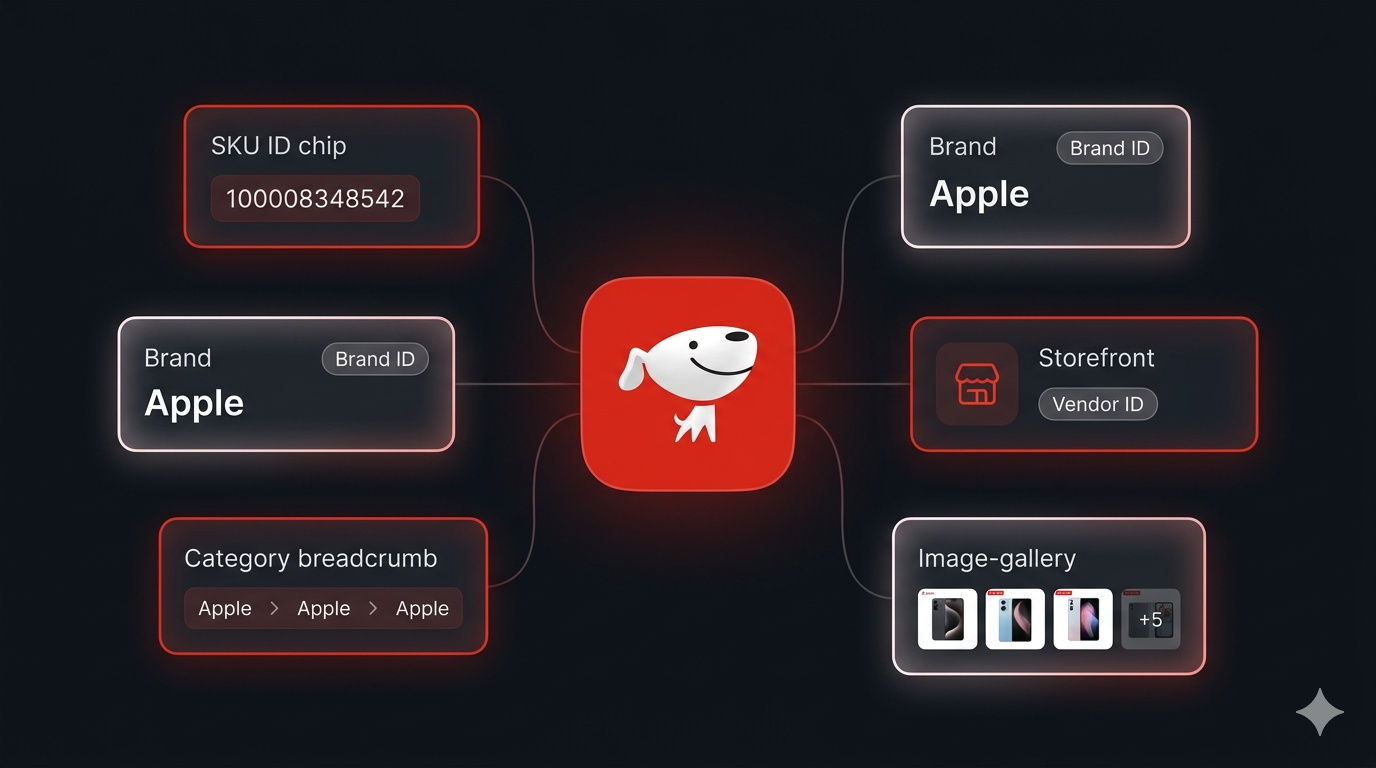
What makes JD valuable as a data source is the depth of structured information embedded in every product page: full product name, brand ID and brand name, the complete category breadcrumb, vendor and shop IDs, shop name, main image, and the full image gallery — all rendered server-side and extractable per SKU. Combined across a SKU list, these fields tell you not just what a product is, but who sells it, where it sits in JD's taxonomy, and how a brand's catalog is distributed between JD self-operated (自营) stores and third-party POP sellers.
Businesses and researchers scrape JD.com data for a range of purposes:
- Brand presence monitoring — track which of your brand's (or a competitor's) SKUs are live on JD, under which shops, and in which categories
- Catalog intelligence — resolve any list of JD SKU IDs into clean structured records with brand, category, and imagery
- POP seller directories — every record exposes
venderIdandshopId, making it easy to build a directory of JD's third-party sellers and map who sells what - Category taxonomy mapping — JD's
categoryIdsand breadcrumbs give you the platform's own classification of every product, useful for normalizing your internal taxonomy - Counterfeit & gray-market detection — spot your brand's products listed by unauthorized third-party shops
- Cross-platform joins — the output schema lines up with the sibling Alibaba Listings Scraper, so JD ↔ Alibaba joins on brand or category are trivial
- Visual catalog enrichment — main image plus the full gallery per SKU feed image-similarity, classification, and enrichment pipelines
Manually opening JD product pages and copy-pasting details is impractical at any meaningful scale — and JD's anti-bot verification makes naïve automation fail fast. A purpose-built scraper is the only realistic approach.
What Data You Can Extract from JD.com
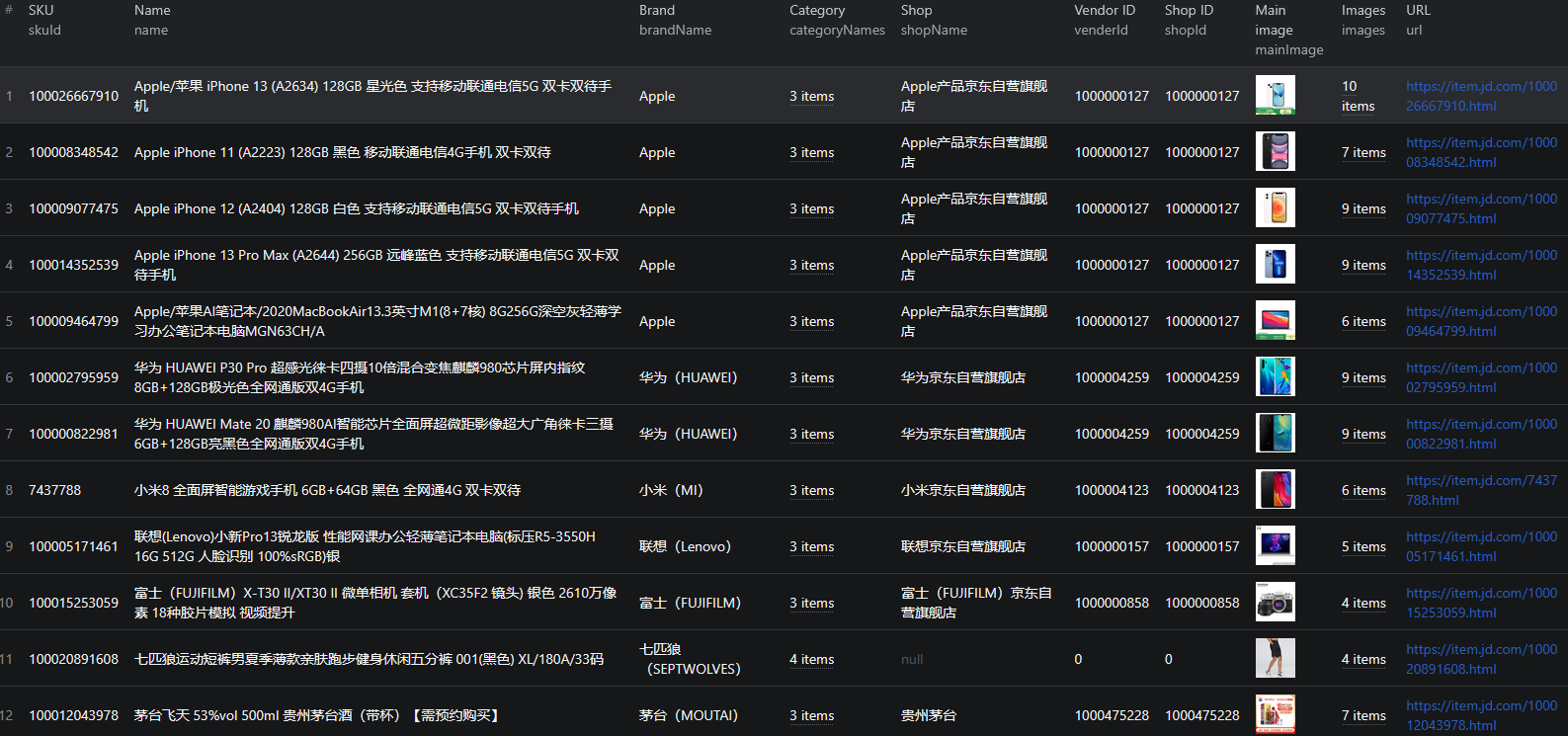
The JD.com Product Scraper turns a list of SKU IDs or item.jd.com URLs into structured product records. Here are the key fields available:
| Field | Description | Example |
|---|---|---|
| SKU ID | JD's unique numeric product identifier | 100008348542 |
| URL | Canonical product page URL | item.jd.com/100008348542.html |
| Title | Full SEO page title as rendered by JD | 【AppleiPhone 11】Apple iPhone 11 (A2223) 128GB... |
| Name | Clean product name | Apple iPhone 11 (A2223) 128GB 黑色 |
| Brand ID / Brand name | JD's brand identifier and display name | 14026 / Apple |
| Vendor ID / Shop ID | Identifiers of the selling vendor and shop — key for POP seller intel | 1000000127 |
| Shop name | Display name of the selling store | Apple产品京东自营旗舰店 |
| Category IDs / names | JD's three-level category classification | [9987, 653, 655] / 手机通讯 › 手机 |
| Breadcrumb | Full navigation breadcrumb including brand and product | 手机通讯 › 手机 › Apple › AppleiPhone 11 |
| Main image | Primary product image (JD CDN URL) | img12.360buyimg.com/n12/... |
| Images | Full product image gallery | [url1, url2, ...] |
| Description | Meta description of the product page | 【AppleiPhone 11】京东JD.COM提供... |
| Scraped at | ISO timestamp of extraction | 2026-05-16T12:00:00.000Z |
One important note: JD loads price and specs asynchronously after the page renders, via APIs that are geo-restricted to mainland China. These fields are intentionally left null / {} in the output. Everything else comes straight from the server-rendered HTML and is captured cleanly on every run.
Common Use Cases for JD.com Data
Brand Presence Monitoring
Resolve a list of your brand's (or a competitor's) SKUs and check exactly how each product is represented on JD — under which shop name, in which category, with what imagery. Re-running the same SKU list on a schedule gives you a change feed for your brand's JD footprint.
POP Seller Directory Building
Every record exposes venderId and shopId, plus the human-readable shopName. Aggregating these across a large SKU sweep is the fastest way to build a directory of JD's third-party POP sellers — who they are, which brands they carry, and which categories they operate in. JD self-operated stores (shop names ending in 京东自营旗舰店) are immediately distinguishable from third-party sellers.
Category Taxonomy Mapping
JD's categoryIds, categoryNames, and full breadcrumb give you the platform's own three-level classification of every product. Mapping your internal catalog onto JD's taxonomy makes cross-platform comparisons and assortment-gap analysis dramatically easier.
Counterfeit & Gray-Market Detection
If your brand's products show up under shops you don't recognize, the venderId / shopId pair tells you exactly which account is selling them. Brand-protection teams use this to detect unauthorized resellers and gray-market inventory on China's most trusted marketplace.
Cross-Platform Chinese E-Commerce Analysis
The output schema is deliberately aligned with the sibling Alibaba Listings Scraper, making JD ↔ Alibaba joins on brand or category trivial. Pair it with 1688 for wholesale sourcing context, Xianyu for the secondhand market, or Temu and AliExpress for the cross-border export view — and you have the full Chinese e-commerce stack covered.
Visual Catalog Enrichment
The mainImage plus the full images gallery on every record enables downstream visual workflows — embedding-based similarity search, automatic attribute classification, or pulling clean product imagery for internal catalog enrichment.
Challenges of Scraping JD.com Manually
Before jumping into the tutorial, it is worth understanding why building your own JD scraper is harder than it looks:
- Anti-bot verification interstitial — JD serves a verification page to automated traffic, and plain HTTP clients hit it almost immediately. Getting past it reliably requires retry logic and request-pattern management
- Geo-restricted APIs — JD's price and spec endpoints only respond to mainland-China traffic, a hard constraint that trips up scrapers expecting complete data from a single request
- Chinese-language parsing — titles, categories, shop names, and breadcrumbs are entirely in Chinese, and encoding or character handling bugs surface in brittle parsers
- SSR data buried in page internals — the structured product data lives in server-rendered page state, not clean DOM elements, and extracting it requires knowing exactly where to look
- Frontend churn — JD updates its page structure regularly, breaking custom scrapers that are not actively maintained
- CDN image URL handling — JD images live on
360buyimg.comwith size-prefixed paths (e.g./n12/), which needs careful URL handling for downstream pipelines
For most use cases, a pre-built and maintained scraper is dramatically more practical than building one in-house.
Step-by-Step: How to Scrape JD.com Product Listings
Here is how to scrape JD.com product data using the JD.com Product Scraper on Apify.
Step 1 — Gather Your SKU IDs or Product URLs
The scraper is SKU-first and accepts two input types:
- SKU IDs — numeric JD product identifiers, e.g.
100008348542. The SKU is the number in every JD product URL - Product URLs — full
https://item.jd.com/{skuId}.htmllinks
You can pull SKUs from:
- Browsing JD.com and copying product URLs directly
- Your existing brand-protection or competitive-intelligence trackers
- Search or category exports from other tools — any list that contains JD product links
Both inputs are combined and de-duplicated automatically, so overlapping lists are fine.
Step 2 — Configure the Scraper Input
Head to the JD.com Product Scraper on Apify and configure your run. At least one of the two fields must be supplied.
Example input:
{
"skuIds": ["100008348542", "100015253059", "100012043978"],
"startUrls": [
{ "url": "https://item.jd.com/100020891608.html" }
]
}
Step 3 — Run the Scraper
Once started, the scraper will:
- Merge
skuIdsandstartUrlsinto a single de-duplicated request list - Fetch each product page and transparently retry through JD's verification interstitial
- Parse the server-rendered HTML for name, brand, category breadcrumb, vendor / shop IDs, shop name, and the full image gallery
- Push one clean structured record per SKU to the dataset
No proxy configuration or API keys are needed on your side — anti-bot handling is built in.
Step 4 — Export Your Results
When the scraper finishes, export your data in the format you need:
- JSON / JSONL — ideal for developers building integrations or catalog pipelines
- CSV — perfect for spreadsheet analysis or importing into BI tools
- Excel / HTML / RSS — for sharing with non-technical stakeholders
- API — access results programmatically via the Apify API for automated workflows
Ready to try it? Run the JD.com Product Scraper on Apify and get your first dataset in minutes.
Example Output (Real Data Preview)

Here is what the actual output looks like. Each product is returned as a structured JSON object:
{
"skuId": "100008348542",
"url": "https://item.jd.com/100008348542.html",
"title": "【AppleiPhone 11】Apple iPhone 11 (A2223) 128GB 黑色 移动联通电信4G手机 双卡双待【行情 报价 价格 评测】",
"name": "Apple iPhone 11 (A2223) 128GB 黑色 移动联通电信4G手机 双卡双待",
"brandId": "14026",
"brandName": "Apple",
"venderId": "1000000127",
"shopId": "1000000127",
"shopName": "Apple产品京东自营旗舰店",
"categoryIds": [9987, 653, 655],
"categoryNames": ["手机通讯", "手机", "手机"],
"breadcrumb": ["手机通讯", "手机", "手机", "Apple", "AppleiPhone 11"],
"mainImage": "https://img12.360buyimg.com/n12/jfs/t1/148767/39/18017/86358/5fd32ff0E5ca41721/d885f7c401dfa557.jpg",
"images": [
"https://img12.360buyimg.com/n12/jfs/t1/148767/.../d885f7c401dfa557.jpg",
"https://img12.360buyimg.com/n12/jfs/t1/142574/.../d2d35afca393e566.jpg"
],
"description": "【AppleiPhone 11】京东JD.COM提供AppleiPhone 11正品行货...",
"price": null,
"specs": {},
"scrapedAt": "2026-05-16T12:00:00.000Z"
}
And a second record from a different category:
{
"skuId": "100015253059",
"url": "https://item.jd.com/100015253059.html",
"title": "【富士X-T30 II】富士(FUJIFILM)X-T30 II/XT30 II 微单相机 套机(XC35F2 镜头) 银色【行情 报价 价格 评测】",
"name": "富士(FUJIFILM)X-T30 II/XT30 II 微单相机 套机(XC35F2 镜头) 银色 2610万像素 18种胶片模拟 视频提升",
"brandId": "7195",
"brandName": "富士(FUJIFILM)",
"venderId": "1000000858",
"shopId": "1000000858",
"shopName": "富士(FUJIFILM)京东自营旗舰店",
"categoryIds": [652, 654, 5012],
"categoryNames": ["数码", "摄影摄像", "微单相机"],
"breadcrumb": ["数码", "摄影摄像", "微单相机", "富士(FUJIFILM)", "富士X-T30 II"],
"mainImage": "https://img12.360buyimg.com/n12/jfs/t1/209321/.../4a72a36b3800c84e.jpg",
"images": ["..."],
"price": null,
"specs": {},
"scrapedAt": "2026-05-16T12:00:00.000Z"
}
Key things to notice:
- One record per SKU — input SKUs and URLs are merged and de-duplicated, so the dataset maps 1:1 to your unique SKU list
brandIdandbrandNametogether — the numeric brand ID is stable across renames, making longitudinal brand tracking reliablevenderId/shopIdon every record — the building blocks of a JD POP seller directory; self-operated 京东自营 stores are immediately distinguishable from third-party sellers- Full three-level category data —
categoryIds,categoryNames, and the completebreadcrumbgive you JD's own taxonomy for free - Complete image gallery —
mainImageplus the fullimagesarray per SKU, ready for visual pipelines price: nullandspecs: {}by design — these load via mainland-China-only APIs after render and are intentionally left empty; everything else is clean SSR datascrapedAttimestamp — every record is timestamped, so longitudinal datasets stay auditable
Try the JD.com Product Scraper now — no coding required.
Automating JD.com Data Collection
For ongoing JD intelligence, you do not want to run the scraper manually every time you need fresh data. The Apify platform supports full automation:
Scheduled Runs
Set up recurring scrapes on any schedule — daily or weekly runs against a fixed SKU list are the standard pattern for brand-presence monitoring. Each run produces a timestamped snapshot, and diffing consecutive snapshots surfaces catalog changes: new shops selling your SKUs, category reassignments, or imagery updates.
API Integration
Use the Apify API to trigger scraper runs programmatically and retrieve results. This lets you integrate JD data into your existing analytics workflows:
- Feed resolved SKU records into your catalog-intelligence pipeline
- Trigger alerts when a tracked SKU appears under a new, unrecognized
shopId - Sync JD product data into your BI warehouse alongside Alibaba records
- Connect to tools like Zapier, Make, or custom data pipelines
Node.js Example
For a complete working example showing how to call this scraper from Node.js, see the GitHub repository.
Webhooks
Configure webhooks to get notified when a scraper run completes. This is useful for event-driven architectures where you want to process new product data as soon as it is available — for example, kicking off a brand-protection check or a JD ↔ Alibaba join the moment a fresh run finishes.
Using JD.com Data for Market Intelligence
The structured data from JD unlocks a range of analytical use cases.
Self-Operated vs. POP Distribution Analysis
Split any SKU set by shop type — JD self-operated (自营) vs. third-party POP sellers — using shopName and venderId. The ratio tells you how a brand distributes on JD: tightly controlled first-party retail, or a long tail of independent resellers. For brand owners, an unexpectedly long tail is the first sign of gray-market leakage.
Seller Concentration by Category
Aggregate records by venderId within each categoryIds slice. The top-N sellers per category tell you which POP accounts dominate each vertical — a quick way to identify both competitors and potential distribution partners in the Chinese market.
Cross-Platform Brand Footprint
Because the schema aligns with the Alibaba Listings Scraper, joining JD and Alibaba records on brandName or category gives you a two-platform view of any brand's Chinese presence: retail positioning on JD, wholesale and B2B presence on Alibaba. Add 1688 for the domestic-sourcing layer and the picture is complete.
Taxonomy Normalization
JD's three-level categoryIds are a clean, stable classification system maintained by the platform itself. Mapping your internal product taxonomy onto JD's once lets every future sweep auto-classify — no manual tagging of Chinese-language product names required.
Visual Catalog Enrichment
The full image gallery per SKU feeds embedding-based similarity search, duplicate detection across sellers, and automatic attribute extraction — particularly useful for spotting identical products listed under different SKUs or shops.
Does JD.com Provide an API?
JD provides developer APIs through its JD Open Platform (宙斯 / JOS), but they are designed for merchants and partners operating on the platform — not for external catalog research.
What's Available
- The official APIs support order management, inventory, logistics, and store operations for authenticated JD merchants
- Access requires a JD developer account, application review, and merchant-level credentials — with documentation entirely in Chinese
- Price and spec data are served by separate internal APIs that are geo-restricted to mainland China
What the API Misses
For anyone outside the JD merchant ecosystem, the official platform offers no practical route to product catalog data: no open product-lookup endpoint, no brand or category browsing, and no cross-seller visibility. For brand tracking and catalog intelligence, scraping the public server-rendered product pages is the practical alternative.
The JD.com Product Scraper gives you structured product records from any list of JD SKUs — without merchant accounts, application reviews, or mainland-China infrastructure.
Why Use a JD.com Scraper Instead of Building One
Building a custom JD scraper sounds straightforward until you actually start:
- Anti-bot verification — JD's interstitial blocks plain HTTP clients almost immediately, and handling it reliably requires retry logic, request-pattern management, and ongoing maintenance
- Geo-restrictions — price and spec APIs only answer mainland-China traffic, and discovering which data is reachable from outside China costs days of trial and error
- SSR parsing complexity — the structured product data lives in server-rendered page state, and extracting brand, category, vendor, and gallery data cleanly requires knowing exactly where each field hides
- Chinese-language handling — encoding bugs in titles, shop names, and breadcrumbs only surface on edge cases, long after the scraper "works"
- Frontend churn — JD updates its page structure regularly, and every update breaks unmaintained scrapers
- Opportunity cost — every hour spent fixing your scraper is an hour not spent on the analysis the scraper exists to support
Unless you have very specific requirements that no existing tool can meet, a maintained scraper lets you focus on insights instead of plumbing.
Try the JD.com Product Scraper
The JD.com Product Scraper turns a list of SKU IDs or item.jd.com URLs into structured product records — names, brands, category breadcrumbs, vendor / shop IDs, shop names, and full image galleries from China's #2 e-commerce platform.
What you get:
- Structured JSON, JSONL, CSV, Excel, HTML, or RSS output ready for any downstream tool
- SKU-first input — paste numeric SKU IDs or full product URLs; duplicates are merged automatically
- JD's anti-bot verification handled transparently, with no proxy or API-key setup on your side
- Brand IDs, three-level category taxonomy, and full breadcrumbs on every record
venderId/shopIdon every record — perfect for building a JD third-party-seller directory- Output schema aligned with the Alibaba Listings Scraper for trivial cross-platform joins
- Scheduled runs and API access for ongoing brand and catalog monitoring
- No coding, no proxy management, no scraper maintenance
Start scraping JD.com now — your first run takes less than 5 minutes to set up.
If you are building a Chinese e-commerce data pipeline, combine JD data with Alibaba for the B2B view, 1688 for domestic wholesale sourcing, Xianyu for the secondhand market, or Temu and AliExpress for the cross-border export channels.
Legal and Ethical Considerations
Web scraping occupies a well-established legal space, but responsible practice matters:
- Public data only — the JD scraper extracts publicly visible product information that anyone can see by visiting item.jd.com. No login or authentication is required
- Respect rate limits — the scraper is designed to make requests at a reasonable pace without aggressive hammering of JD's infrastructure
- No misuse — use collected data for legitimate business purposes like catalog research, brand protection, and competitive analysis. Do not use the data to create counterfeit listings or mislead buyers
- Data-protection compliance — the scraper extracts product and shop data, not personal data, but downstream use is your responsibility under applicable regulations
JD product pages are public marketplace data — they are designed to be found by buyers. Scraping this data for catalog research and brand intelligence is aligned with the platform's intended purpose.
Frequently Asked Questions
What is JD.com?
JD.com (Jingdong, formerly 360buy) is China's second-largest e-commerce platform after Alibaba's Taobao/Tmall. Unlike Alibaba's pure marketplace model, JD operates a hybrid: a first-party retail business with its own nationwide logistics network, plus a third-party POP (Platform Open Plan) marketplace. It is the go-to destination for electronics, appliances, and authentic branded goods in China.
Is scraping JD.com legal?
Scraping publicly available product data from JD.com is generally legal. Product pages on item.jd.com are visible to anyone without logging in. You should always use the data responsibly, comply with applicable data-protection regulations, and avoid overloading JD's servers with excessive requests.
What input does the JD.com Product Scraper accept?
Two fields: skuIds (an array of numeric JD SKU IDs like 100008348542) and startUrls (full item.jd.com/{skuId}.html product URLs). You can supply either or both — the inputs are combined and duplicates are removed automatically.
Why are price and specs null in the output?
JD.com loads prices and specifications asynchronously after the product page renders, via APIs that are geo-restricted to mainland China. These fields are intentionally left null / {} in the output. Everything else — name, brand, category breadcrumb, vendor and shop IDs, shop name, and the full image gallery — comes straight from the server-rendered HTML and is captured cleanly.
How does the scraper handle JD's anti-bot verification?
JD serves a verification interstitial to automated traffic. The scraper transparently detects and retries through it, so you get clean server-rendered product data every time — with no proxy setup or API keys required on your side.
Can I join JD data with Alibaba data?
Yes. The output schema is deliberately aligned with the sibling Alibaba Listings Scraper, so JD ↔ Alibaba joins on brand or category are trivial. This makes cross-platform Chinese e-commerce analysis — for example comparing a brand's retail presence on JD against its wholesale presence on Alibaba — straightforward.
About the Author
This guide was written by Piotr, a software engineer with hands-on experience building and maintaining web scrapers at scale. He develops and maintains a suite of data extraction tools on the Apify platform, helping businesses automate their data collection workflows.
Need help with your scraping project?
Book a free discovery call and let's scope your project together.
Book a Call