
How to Scrape Temu Products for a Price Watchlist
The useful starting point for a Temu price tracker is a list of products you already want to watch. The Temu Listings Scraper takes page URLs and returns structured product records, including prices, currencies, ratings, and store IDs. You can run it on Apify without writing code.
I maintain this Actor. This guide uses product URLs because that is the workflow described in its current documentation. The input is named searchUrls, but the name alone is not a promise that it will discover an entire category or paginate through search results.
Start with a watchlist, not a whole category
Pick two or three products whose prices would affect a decision: an item you sell, a substitute a customer might buy, or a product you are considering stocking. Open each product page and copy its full URL. Keep any variant selections with your notes so that you can check the same version later.
A Temu product record is a snapshot of what the scraper receives. It is not a checkout quote for every buyer. Before acting on a price difference, check the selected variant, quantity, destination, and any account-specific promotion in the storefront.
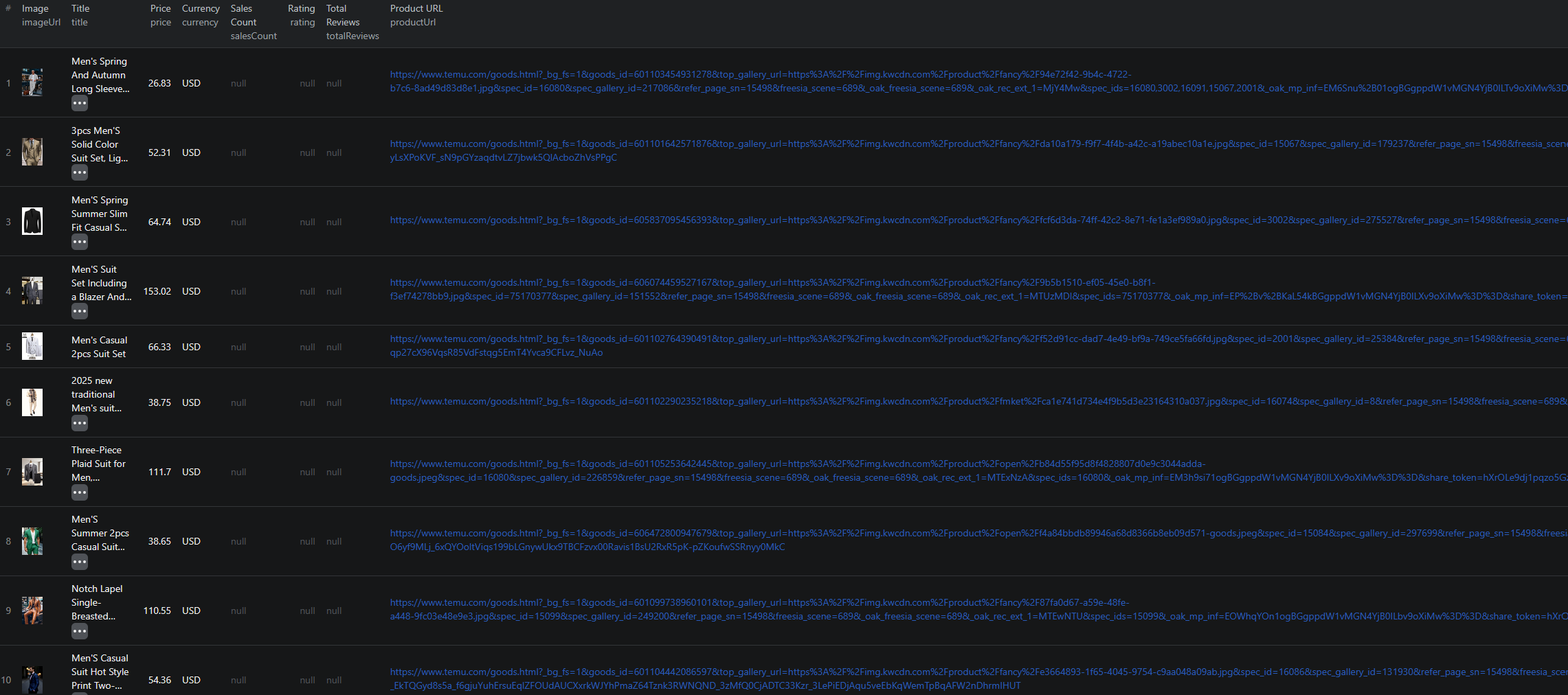
The output includes these useful groups of fields:
| Fields | Use them for |
|---|---|
id, productUrl, storeId | Keeping products and sellers identifiable across runs. |
price, originalPrice, currency | Comparing displayed prices in the same currency. |
rating, totalReviews, salesCount | Adding context to a price comparison. Displayed counts may be formatted strings. |
imageUrl, additionalImages, description | Checking that a row refers to the product you intended to track. |
These are product summaries. A review count does not mean the dataset includes the text of each customer review.
Run a two-product check
Open the Actor, sign in to Apify, and switch the Input editor to JSON. Paste this example, replacing the historical product URLs with your own if either listing is unavailable:
{
  "searchUrls": [
    "https://www.temu.com/goods.html?goods_id=601099769178067",
    "https://www.temu.com/goods.html?goods_id=601099952001588"
  ]
}
Use searchUrls, exactly as written. Older versions of this guide used startUrls; that does not match the current input schema. The schema also contains a search-page prefill while the README describes product pages. Until search coverage is confirmed for your use case, build the first run around known product URLs.
There is no product-limit setting in the current input schema. Keep the URL list small and check Apify's run charge limit before starting. Do not paste a guessed maxItems field and assume it controls the run.
Click Start, then inspect the run status and its dataset. For this check, look for the two requested product IDs. A completed run with fewer records deserves investigation before you expand the list. Open each returned link and compare its title, currency, and price with the product you intended to collect.
The existing screenshot below shows the output layout from an earlier run. It is not a current price check.
Pricing as of September 6, 2026: the configured product event is $0.0015 per saved result. Two saved products correspond to $0.003 in product event fees. Confirm the current pricing and the run's charge breakdown before scaling; the number of input URLs is not itself a billing record.
Turn the export into a price history
Export the dataset as CSV for a spreadsheet or JSON if you need the image arrays and other nested fields. For the spreadsheet, start with id, title, storeId, price, originalPrice, currency, and productUrl. Add a column containing the collection time and another for the variant you checked manually.
Keep every dated export. Overwriting yesterday's file leaves you with a product list, not a history.
To compare two runs:
- Match records by product ID and currency. Keep different variants separate if your watchlist distinguishes them.
- Exclude missing prices from calculations. A blank price should not become a zero-price offer.
- Calculate the change as
(new price - old price) / old price, using only positive old prices. - Open the changed listings before making a buying or repricing decision.
For example, a move from 20 to 18 in the same currency is a 10% decrease. That is an illustrative calculation, not a result from these example URLs. A displayed discount against originalPrice answers a different question: it compares two values on one page, rather than a price observed on two dates.
Keep salesCount as the original text alongside any parsed number. A value such as “10K+” is a lower-bound display, not an exact transaction count. Changes to that display do not establish how many items sold during your collection interval.
Once the comparison works, save the input as an Apify task and schedule it at an interval that suits your decision. Start with a small watchlist and review a few successive runs before expanding it.
When a row looks wrong
No result for a URL: open the product manually and check whether the link redirects, the product has disappeared, or it requires a different regional storefront. Review the run log for that URL. Repeating a large batch will not clarify which input failed.
Different price from your browser: check currency and variant first, then the promotion and destination shown to your account. Keep the raw scraped value; do not silently replace it with a price from a different context.
Missing video, review count, or image: these fields depend on what the source exposes. Preserve missing values instead of filling them with invented defaults.
Need category discovery: this walkthrough does not establish complete search or category coverage. Test that requirement separately before relying on the Actor to discover your watchlist.
For a coded workflow, the Temu Node.js example is available as a separate reference. Compare its inputs with the current Actor before adapting it.
Questions before you run
Can I search Temu by keyword with this example?
This example uses product URLs. The current input is named searchUrls, but its schema and README differ on search-page coverage. Verify search behavior separately rather than assuming keyword discovery or complete pagination.
Does the dataset contain customer review text?
The documented product output includes rating and review-count fields. This guide does not establish support for extracting individual customer reviews.
How do I limit a Temu test run?
Provide a short URL list and review the run charge limit in Apify. The current Actor input schema has no maxItems or similar product-count setting.
