How to Search Alibaba by Image and Find Suppliers
Keyword searches work poorly when a product has a generic name, appears under translated titles, or is easier to recognize than describe. A photo can find the right product family, but sourcing still requires price, minimum order quantity, and supplier context beside every match.
Our Alibaba Image Search Scraper accepts direct product-image URLs and returns visually similar Alibaba listings. Results include price ranges, minimum order quantities, supplier names and countries, years on Alibaba, third-party verification labels, review scores, and links to the product and supplier pages.
The output is a supplier-research shortlist, not a purchasing decision. A similar photo does not confirm materials, dimensions, certification, product ownership, or the final quoted price.
Search one photo and review ten matches
- Open the Actor on Apify and click Try for free.
- Add a direct product-image URL under Image URLs.
- Set Max matches per image to
10for the first review. - Keep the automatic Apify proxy setting and click Start.
We used this input:
{
  "imageUrls": [
    "https://cbu01.alicdn.com/img/ibank/O1CN01ImHZo51sn2AJ4qBDw_!!2009745810-0-cib.jpg"
  ],
  "maxResultsPerImage": 10,
  "proxyConfiguration": {
    "useApifyProxy": true
  }
}
The image must be a directly accessible JPEG, PNG, WebP, GIF, or AVIF file no larger than 10 MB. A product page or cloud-sharing preview is not a direct image URL. Base64 data: URLs also work when sending JSON through the API.
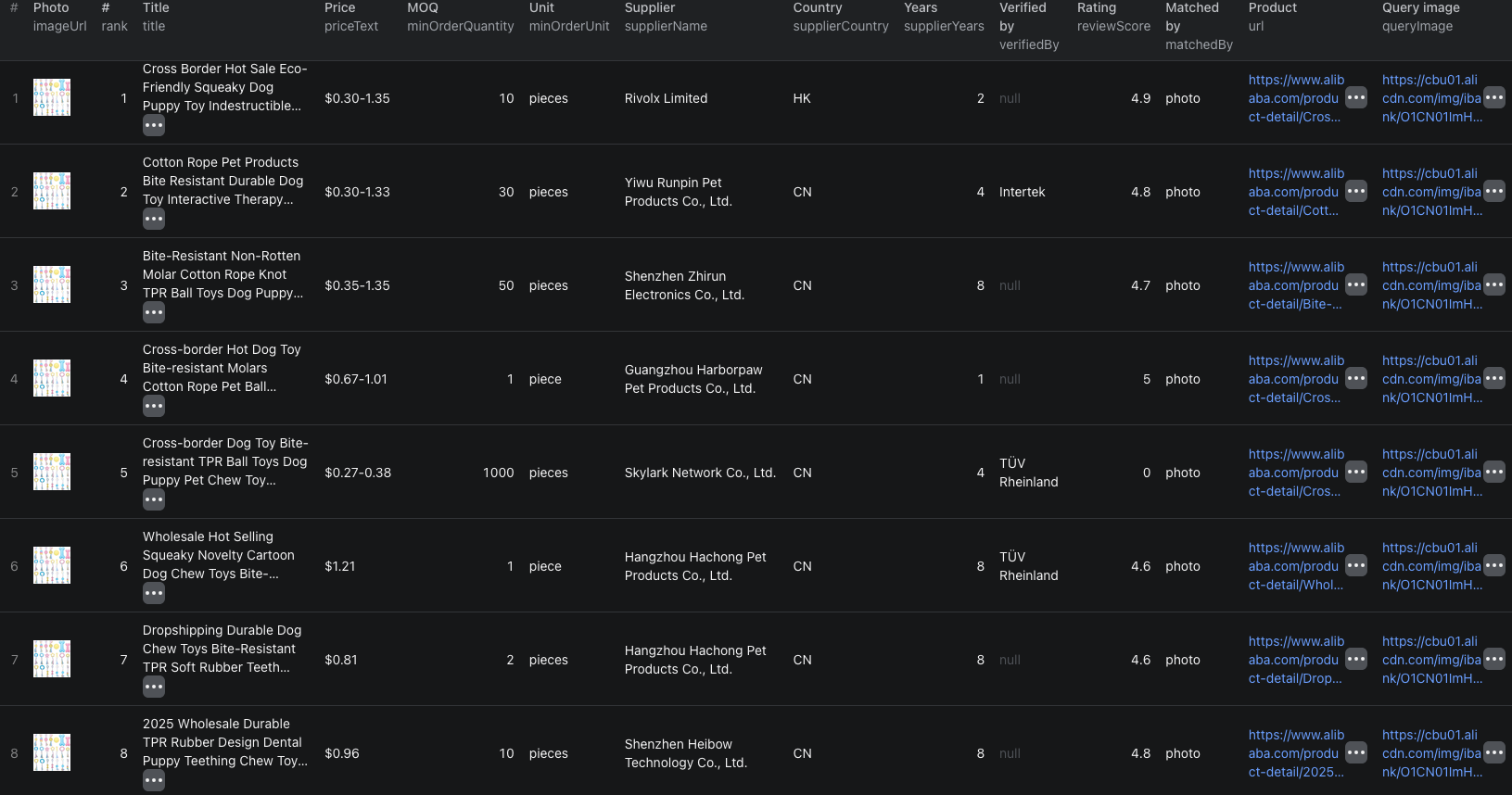
Our example run returned ten visually similar dog-toy listings. One abbreviated match was:
{
  "rank": 2,
  "matchedBy": "photo",
  "productId": "1601383824900",
  "url": "https://www.alibaba.com/product-detail/Cotton-Rope-Pet-Products-Bite-Resistant_1601383824900.html",
  "title": "Cotton Rope Pet Products Bite Resistant Durable Dog Toy",
  "priceText": "$0.30-1.33",
  "priceMin": 0.3,
  "priceMax": 1.33,
  "currency": "USD",
  "minOrderQuantity": 30,
  "minOrderUnit": "pieces",
  "supplierName": "Yiwu Runpin Pet Products Co., Ltd.",
  "supplierCountry": "CN",
  "supplierYears": 4,
  "verifiedBy": "Intertek",
  "reviewScore": 4.8,
  "reviewCount": 57,
  "scrapedAt": "2026-09-22T05:45:03.905Z"
}
| Field group | How to use it |
|---|---|
queryImage, rank, matchedBy | Keep each match connected to its source photo and understand whether it came from the whole photo, another detected object, or a suggested category. |
productId, url, images | Deduplicate listings, reopen the source page, and compare more than the first product image. |
priceMin, priceMax, promotionPriceMin | Preserve Alibaba's displayed range. It is not a supplier quote or complete landed cost. |
minOrderQuantity, minOrderUnit | Remove suppliers whose displayed order size does not fit the sourcing brief. |
supplierName, supplierCountry, supplierYears | Build a supplier shortlist without confusing marketplace tenure with independent proof of quality. |
verifiedBy, certifications, supplierCertifications | Use source labels as verification leads, then confirm any decision-critical certificate with the issuer. |
The Alibaba image-search Node.js example runs the same ten-match search with apify-client and retrieves the dataset.
Turn visual matches into a supplier shortlist
Do not choose the lowest priceMin before confirming what that price represents. The image-search results can mix sizes, pack quantities, materials, accessories, and customization levels.
A useful review sequence is:
- Remove results that are visibly different products or accessories.
- Group the remaining rows by comparable MOQ and unit.
- Open each listing and confirm the variant, specifications, packaging, and customization terms.
- Keep the displayed price range beside the MOQ. Do not convert the lowest tier into a universal unit cost.
- Review the supplier page and verify any certification or compliance claim needed for your market.
Use the Alibaba product details guide to enrich shortlisted listings with current product and supplier fields. The Alibaba listings guide is a better starting point when you already know the search terms and want broader category discovery.
Know what happens above 100 matches
The first 100 results are matches for the whole photo. When maxResultsPerImage is above 100, the Actor can continue with other objects detected in the image and then suggested product categories, in additional groups of up to 100.
Every row includes matchedBy. Values such as object in photo and category: <name> explain why later results appeared. Category searches are broader and can drift from the original product, so review them separately from the first photo-match group.
Start with 20 to 50 matches. Ask for more only when the first set is relevant and a broader longlist is useful. More rows do not make the visual matches more exact.
Pricing
Pricing as of September 22, 2026 is:
| Event | Price |
|---|---|
| Image search | $0.02 per image that returns matches, covering the first group of up to 100 results |
| Additional results | $0.01 per extra group of up to 100 new matches for the same image |
Our one-image, ten-result example cost $0.02 in Actor event charges. An image that cannot be loaded or returns no matches produces a free status row. Apify platform or proxy usage may be billed separately according to your plan. Check live pricing before submitting a large image batch.
Fix the common sourcing mistakes
- The Actor returns
image_error. Confirm that the URL opens the raw image without a login and that the file is a supported type under 10 MB. - A match looks right but has a very different MOQ. Treat it as a different commercial offer and compare like-for-like order quantities.
- The lowest displayed price looks unrealistic. Open the listing and check its quantity tier, variant, promotion, customization, shipping, and tax context.
- A supplier is marked as verified. Preserve the named verifier, but confirm the scope and current status of any claim that affects your decision.
- Results above rank 100 become less relevant. Separate rows by
matchedBy; detected-object and category searches intentionally broaden the search. - Two photos find the same product. Deduplicate on
productId, while retaining the query-image and rank relationship in a separate match table.
Frequently asked questions
Can I upload a product photo from my computer?
The Actor accepts a public JPEG, PNG, WebP, GIF, or AVIF URL up to 10 MB, or a base64 data URL. A normal webpage URL is not an image URL.
Does a visual match prove that two products are identical?
No. Image search finds visually similar Alibaba listings. Confirm dimensions, materials, variants, certifications, packaging, and supplier terms before treating a match as the same product.
How many Alibaba matches can one image return?
The first image-search event covers up to 100 photo matches. Requests above 100 can continue through other detected objects and suggested categories in additional groups of up to 100, with broader results later.