Piotr VassevPiotr Vassev

How to Scrape Eventbrite Events and Event Data (Step-by-Step Guide)

How to Scrape Eventbrite Events and Event Data

If you want to scrape Eventbrite events for lead generation, market research, competitor tracking, or event aggregation, this guide walks you through the entire process. You will learn what data you can extract from one of the world's largest event discovery platforms, how to automate the collection, and how to turn raw Eventbrite listings into actionable event intelligence.

Why Scrape Eventbrite Data?

Eventbrite is one of the most widely used platforms for discovering and registering for events — from local networking meetups and industry conferences to concerts, food festivals, and community workshops. Millions of events are listed globally every year, making it one of the richest publicly available sources of structured event data anywhere.

What makes Eventbrite particularly valuable is the range of data it exposes: event names, organizers, dates, venues, pricing, categories, and descriptions are all publicly visible on every listing. For anyone who needs to track events at scale — whether for competitive intelligence, lead generation, or market analysis — that breadth of structured data is a major asset.

Businesses and researchers scrape Eventbrite data for a range of purposes:

  • Lead generation — identify event organizers, sponsors, and attendees relevant to your target market
  • Competitor tracking — monitor events hosted by competing organizations or in competing markets
  • Market research — analyze which event categories, venues, and formats are most active in a given geography or industry
  • Event aggregation — build curated event directories or local guides powered by real Eventbrite data
  • Venue intelligence — understand which venues host the most events and in which categories
  • Trend monitoring — track how event activity in specific industries or regions changes over time

Manually copying event details from Eventbrite search pages is completely impractical at scale. A single search can return hundreds of events across dozens of pages, and listings change continuously. Automation is the only viable approach for meaningful data collection.

What Data You Can Extract from Eventbrite

The Eventbrite Event Scraper extracts structured data from Eventbrite search result pages. Here are the key fields available:

FieldDescriptionExample
NameFull event titleDallas Mardi Gras Food Brunch
URLDirect link to the event pageeventbrite.com/e/dallas-mardi-gras-food-brunch...
ImageEvent cover image URLimg.evbuc.com/...
DescriptionShort event description or summaryCelebrate Mardi Gras over Jambalaya, Crawfish, King Cake...
Start DateEvent start date2025-02-16
End DateEvent end date2025-02-16
Start TimeEvent start time11:00
End TimeEvent end time16:00
TagsEvent category and keyword tagsFood & Drink, Celebration, Festive
Venue NameName of the event venueLofty Spaces
Venue AddressFull address including street, city, region, postal code, country, and coordinates816 Montgomery Street, Dallas, TX 75215
Is Online EventWhether the event is virtual or in-personfalse
Published AtTimestamp when the event was published2025-01-13T01:36:07Z

This data gives you everything you need to analyze event activity, identify organizers, track venues, and build event-driven intelligence pipelines.

Common Use Cases for Eventbrite Data

B2B Lead Generation

Event organizers are, by definition, active businesses running public-facing activities. Scraping Eventbrite lets you build targeted lead lists of companies and individuals who organize events in your target industry or geography — whether that is networking events, trade shows, workshops, or conferences.

You get the event name, organizer information visible on the listing, location, and context through tags and descriptions — giving you enough to qualify leads and personalize outreach.

Competitor and Market Monitoring

If your business operates in events — venue management, event technology, sponsorship, catering, AV production — Eventbrite is one of the best sources of market intelligence available. Scrape events in your geographic or industry segment to understand how often events are being organized, what formats are popular, and how competitors are positioning their events.

Recurring scrapes over weeks or months reveal seasonal patterns, growth trends, and emerging event formats that manual research would completely miss.

Event Aggregation and Discovery Platforms

Building a curated event guide or local calendar app? Eventbrite data gives you a structured, comprehensive feed of events in any location and category. Instead of manually curating listings, automated scraping keeps your event directory continuously updated with fresh data.

Tags, dates, venue coordinates, and descriptions give you all the metadata you need to filter, categorize, and display events in any format.

Venue and Location Intelligence

Venue names and full address data — including GPS coordinates — let you map event activity geographically. Which neighborhoods host the most events? Which venues are most active in a specific event category? Where are events growing or declining over time?

This kind of venue intelligence is valuable for real estate analysis, hospitality businesses, and urban planners trying to understand how event activity shapes commercial districts.

Industry Trend Analysis

Tracking which event categories, tags, and keywords appear most frequently over time reveals where industries are investing in community building and knowledge sharing. A surge in AI-focused networking events in a specific city tells you something about local market maturity. A wave of wellness or sustainability events signals shifting consumer priorities.

Eventbrite data, scraped regularly and indexed over time, is a surprisingly rich signal for industry trend analysis.

Challenges of Extracting Eventbrite Data Manually

Before jumping into the tutorial, it is worth understanding why scraping Eventbrite at scale is harder than it looks:

  • Paginated search results — event searches return results across many pages, all of which need to be navigated and parsed to collect data comprehensively
  • JavaScript-rendered content — Eventbrite uses dynamic page loading, meaning simple HTTP requests will not return usable listing data
  • Large result sets — popular locations or categories can return thousands of events, making manual collection completely impractical
  • Rate limiting — sending too many requests from a single IP can trigger throttling or temporary blocks
  • Maintenance overhead — Eventbrite updates its frontend regularly, which means custom scrapers break and require constant attention to stay functional

Building and maintaining your own Eventbrite scraper is a significant engineering commitment. For most use cases, a pre-built, maintained solution is the more practical choice.

Step-by-Step: How to Scrape Eventbrite Events

Here is how to scrape Eventbrite data using the Eventbrite Event Scraper on Apify.

Step 1 — Find Your Search URL on Eventbrite

Navigate to eventbrite.com and use the search filters to find the events you want to extract. You can filter by:

  • Location — search for events in a specific city or region
  • Date range — filter by upcoming dates or a specific time window
  • Category — narrow to a specific event type such as food, music, business, or tech
  • Keywords — search by event topic or theme

Once your search results are showing the events you want, copy the full URL from your browser. That URL is your scraper input. Examples:

  • Food & drink events in Dallashttps://www.eventbrite.com/d/tx--dallas/food-and-drink/
  • Business events in New Yorkhttps://www.eventbrite.com/d/ny--new-york/business/
  • Tech conferences this weekendhttps://www.eventbrite.com/d/online/tech/this-weekend/

Step 2 — Configure the Scraper Input

Head to the Eventbrite Event Scraper on Apify and configure your run:

  1. Paste your Eventbrite search URL into the searchUrls input field
  2. You can add multiple search URLs to collect events from multiple searches in a single run
  3. Set maxItems to control how many events to extract per search URL
  4. Click Start to begin the extraction

The scraper handles browser rendering, pagination, and data parsing automatically — no additional configuration required.

Step 3 — Run the Scraper

Once started, the scraper will:

  • Load each search result page and extract event data
  • Navigate through all available pages automatically
  • Parse structured event data including names, dates, venues, and tags
  • Store results in a clean, structured dataset

Processing time depends on the number of events and pages. Most runs complete within a few minutes.

Step 4 — Export Your Results

Once the scraper finishes, you can export the results in multiple formats:

  • JSON — ideal for developers building data pipelines or integrations
  • CSV — perfect for spreadsheet analysis in Excel or Google Sheets
  • API — access results programmatically via the Apify API for automated workflows

Each record includes the full set of structured fields: event name, URL, image, description, dates and times, tags, venue details with coordinates, online event flag, and publication timestamp.

Ready to try it? Run the Eventbrite Event Scraper on Apify and get your first dataset in minutes.

Example Output (Real Data Preview)

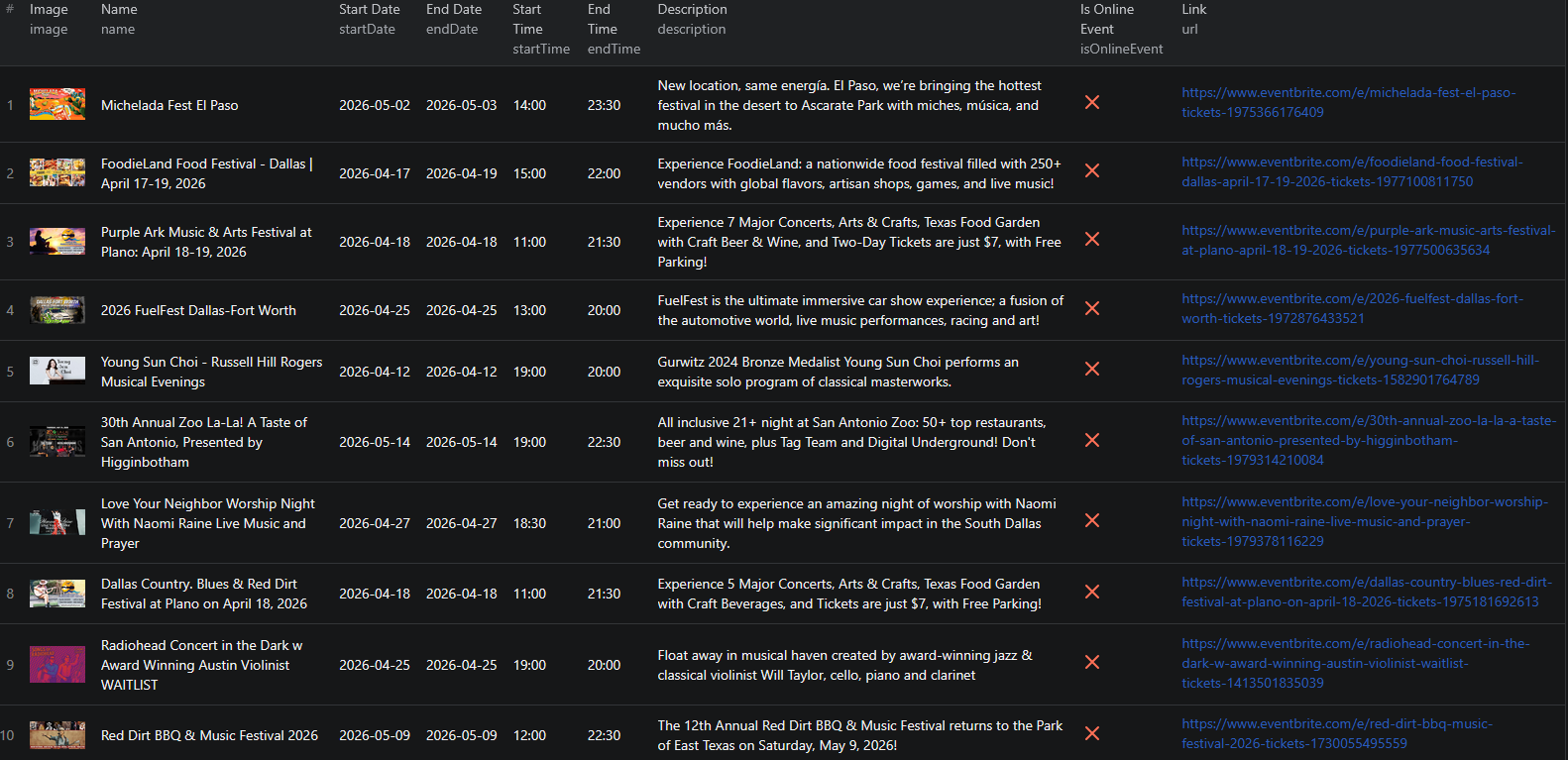
Eventbrite scraper results

Here is what the actual output looks like from the Eventbrite Event Scraper. Each event returns a structured JSON object:

{
  "name": "Dallas Mardi Gras Food Brunch",
  "url": "https://www.eventbrite.com/e/dallas-mardi-gras-food-brunch-tickets-1149044837039",
  "image": "https://img.evbuc.com/https%3A%2F%2Fcdn.evbuc.com%2Fimages%2F933882313%2F...",
  "description": "This year we will celebrate the beautiful culture of Mardi Gras over Jambalaya, Boudain, Shrimp & Grits, Crawfish, King Cake & more",
  "startDate": "2025-02-16",
  "endDate": "2025-02-16",
  "startTime": "11:00",
  "endTime": "16:00",
  "tags": [
    "Food & Drink",
    "Dinner or Gala",
    "Celebration",
    "Event",
    "Festive",
    "Foodfestival",
    "Mardigras",
    "dallas_mardi_gras",
    "food_brunch"
  ],
  "venue": {
    "name": "Lofty Spaces",
    "address": {
      "city": "Dallas",
      "country": "US",
      "region": "TX",
      "longitude": "-96.7898652",
      "localized_address_display": "816 Montgomery Street, Dallas, TX 75215",
      "postal_code": "75215",
      "address_1": "816 Montgomery Street",
      "address_2": "",
      "latitude": "32.762849",
      "localized_area_display": "Dallas, TX"
    }
  },
  "isOnlineEvent": false,
  "publishedAt": "2025-01-13T01:36:07Z"
}

Key things to notice:

  • Full venue data — address, city, region, postal code, and GPS coordinates are all included, making geographic analysis and mapping straightforward
  • Rich tag data — each event includes both category tags and keyword tags, enabling precise filtering and segmentation
  • Precise timing — start and end dates and times are returned separately, so you can calculate event duration, filter by time of day, or group events by schedule
  • Online event flagisOnlineEvent lets you instantly distinguish virtual events from in-person ones without parsing the description
  • Publication timestamppublishedAt tells you exactly when the event went live on Eventbrite, useful for freshness filtering and trend tracking

This structured format imports cleanly into any spreadsheet, database, or analytics platform.

Try the Eventbrite Event Scraper now — no coding required.

Automating Eventbrite Event Monitoring

For ongoing lead generation, market tracking, or event aggregation, you do not want to run the scraper manually every time. The Apify platform supports full automation:

Scheduled Runs

Set up recurring scrapes on any schedule — daily, weekly, or monthly. The scraper runs automatically and stores results in a dataset you can access anytime. Daily runs work well for tracking newly published events in fast-moving categories. Weekly runs are sufficient for market research and lead generation workflows where freshness requirements are lower.

API Integration

Use the Apify API to trigger scraper runs programmatically and retrieve results. This lets you integrate Eventbrite data into your existing workflows:

  • Feed event data into CRM systems or lead enrichment pipelines automatically
  • Trigger alerts when new events matching your target criteria appear
  • Build event dashboards that refresh on a schedule with live Eventbrite data
  • Connect to tools like Zapier, Make, or custom data pipelines

Event Discovery Pipelines

Combine scheduled scraping with downstream processing to build fully automated event intelligence pipelines. Filter events by tag, venue, date range, or geography. Store historical data to track trends over time. Enrich event records with organizer contact information for sales outreach.

Node.js Example

For a complete working example showing how to call this scraper from Node.js, see the GitHub repository.

Webhooks

Configure webhooks to get notified when a scraper run completes. This is useful for event-driven workflows where you want to process new event data as soon as the scraper finishes — for example, to immediately push new events to a database or trigger a notification.

Using Eventbrite Data for Event Intelligence

Eventbrite data powers a range of event analytics and lead generation applications.

Organizer Lead Scoring

Events are a strong signal of business activity. Combine event frequency, category, size (inferred from venue capacity or ticket pricing), and publication recency to build a lead scoring model for event organizers. High-frequency organizers running events in your target vertical are high-priority leads. Low-frequency organizers running one-off events may need different outreach.

Geographic Event Mapping

Venue coordinates let you map event density geographically with minimal post-processing. Visualize where events cluster by category, identify underserved markets, and find regions where event activity is growing — all from structured scraping output.

Seasonal and Category Trend Analysis

Aggregate Eventbrite data over time by tag, category, and month to reveal seasonal patterns. When do food festivals peak? Which months see the highest tech conference activity? How has corporate event volume changed year over year? Scraped data, stored systematically, answers these questions precisely.

Competitor Event Tracking

If you know which organizers or brands run events relevant to your market, scrape their events specifically and set up scheduled runs to stay current. Track how often they run events, what formats they favor, where they host events, and how far in advance they publish listings.

Does Eventbrite Provide an API?

Eventbrite does offer a limited API, but it comes with significant restrictions that make it impractical for large-scale data collection:

  • Authentication required — you need an API key and must register as a developer
  • Rate limits — the API enforces strict request caps that limit how much data you can retrieve
  • Limited data scope — not all publicly visible event data is available through the API
  • Approval process — access to certain data endpoints requires additional approval

Your practical options for comprehensive event data extraction are:

  • Eventbrite's official API — suitable for small-scale use but constrained by rate limits and scope
  • Custom scraper — requires development time, ongoing maintenance, and infrastructure for dynamic content and pagination
  • Pre-built scraper — a maintained solution like the Eventbrite Event Scraper that handles all technical complexity out of the box

For most teams running at any meaningful scale, the pre-built scraper delivers more data with less overhead than working within the API's constraints.

Why Use an Eventbrite Scraper Instead of Building One

Building a custom Eventbrite scraper sounds straightforward until you encounter the real challenges:

  • Dynamic content — Eventbrite renders listings using JavaScript. Simple HTTP requests will not return event data, so you need full browser automation
  • Pagination handling — search results span many pages that require automated navigation. Eventbrite's pagination patterns change with frontend updates
  • Anti-bot protection — reliable scraping at scale requires proxy rotation, request throttling, and detection avoidance — each of which requires ongoing engineering and operational investment
  • Maintenance burden — Eventbrite updates its frontend regularly. Every update is a potential breakage that requires immediate intervention to keep your pipeline running
  • Scaling infrastructure — scraping thousands of events requires distributed infrastructure, queue management, and monitoring that adds operational complexity fast
  • Opportunity cost — every hour spent building and maintaining a scraper is an hour not spent analyzing event data, generating leads, or building your product

Unless you have highly specific requirements that no existing tool can meet, a pre-built, maintained scraper lets you focus on using the data rather than collecting it.

Try the Eventbrite Event Scraper

The Eventbrite Event Scraper extracts structured event data from Eventbrite search result pages — names, dates, times, tags, venues with full address and coordinates, organizer data, online event status, and direct event URLs.

What you get:

  • Structured JSON or CSV output ready for analysis
  • Any Eventbrite search URL as input — filter by location, date, category, or keyword
  • Full venue data including GPS coordinates for geographic analysis
  • Rich tag data for filtering and segmentation
  • Automatic pagination to collect all events in your search
  • Scheduled runs for ongoing event monitoring and lead generation
  • API access for integration into your data workflows
  • No coding or scraper maintenance required

Start scraping Eventbrite now — your first run takes less than 5 minutes to set up.

If you are building a broader event and local market intelligence pipeline, combine Eventbrite data with venue and location data from tools like the Store Locator Scraper for a complete picture of physical activity in your target markets.

Legal and Ethical Considerations

Web scraping occupies a well-established legal space, but responsible practice matters:

  • Public data only — the Eventbrite scraper extracts publicly visible event information that anyone can see by visiting Eventbrite without logging in
  • Respect rate limits — the scraper is designed to make requests at a reasonable pace to avoid overloading Eventbrite's servers
  • Responsible use — use collected data for legitimate business purposes like market research, lead generation, and event intelligence
  • Privacy compliance — if you operate in the EU or California, ensure your data handling complies with GDPR or CCPA. This applies to how you store and process data, not to the collection of publicly visible event information

Frequently Asked Questions

Is scraping Eventbrite legal?

Scraping publicly available data from Eventbrite is generally legal. Event listings are visible to anyone who visits the site without logging in. You should always use the data responsibly, comply with applicable privacy regulations, and avoid overloading Eventbrite's servers with excessive requests.

Does Eventbrite have an API?

Eventbrite does offer a limited public API, but it requires authentication and has usage restrictions that make it impractical for large-scale data collection. A web scraper gives you direct access to all publicly visible event data without API key limitations or rate caps.

What data can be extracted from Eventbrite?

You can extract event names, URLs, images, descriptions, start and end dates and times, tags, venue names, full venue addresses (city, region, postal code, country, coordinates), online event status, and publication timestamps. Each event is returned as a structured JSON object.

How do I use the Eventbrite Scraper?

Copy any Eventbrite event search page URL — for example, a search filtered by location, date range, or category — and paste it as input. The scraper handles pagination and returns all matching events as structured JSON.

Can I scrape Eventbrite events by location or category?

Yes. Any Eventbrite search URL can be used as input, including URLs filtered by location, event category, date range, or keyword. The scraper processes all search result pages and returns the matching events.

Can I export Eventbrite event data to CSV or JSON?

Yes. The Eventbrite Event Scraper exports data in both JSON and CSV formats. You can also access results via the Apify API for automated workflows and data pipeline integrations.

About the Author

This guide was written by Piotr, a software engineer with hands-on experience building and maintaining web scrapers at scale. He develops and maintains a suite of data extraction tools on the Apify platform, helping businesses automate their data collection workflows.

Need help with your scraping project?

Book a free discovery call and let's scope your project together.

Book a Call
Piotr Vassev

Piotr Vassev

Founder of FalconScrape. Building production-grade web scraping systems and data automation pipelines for businesses worldwide.

Connect on LinkedIn