How to Scrape TikTok Video Transcripts and Post Data

If you want to scrape TikTok video transcripts for creator research, competitor monitoring, or feeding an AI pipeline, this guide walks you through the whole process. You will learn how to turn any public TikTok video into clean, timestamped, searchable text — with the full post context attached — and what to do with that text once you have it.
Why Scrape TikTok Video Transcripts?
TikTok is the largest video corpus in marketing, and almost none of it is readable.
The caption under a video is a hook, a couple of hashtags and an emoji. The actual claim, the actual product name, the actual joke, the actual price — all of it is spoken aloud. Every social listening tool that reads captions is reading the label on the box and calling it the contents.
The gap is bigger here than on any other platform. A LinkedIn post at least carries a paragraph of text. A TikTok caption is often eight words. Meanwhile a 60-second clip contains around 150 spoken words of specific, quotable content, and a "NASA Minute" style explainer runs to 250.
What makes TikTok unusual is that a transcript already exists for most of those videos. TikTok generates captions for videos with speech and serves them in the player — it just gives you no way to view, export or search them. Roughly 2 in 3 videos with speech carry that caption track. The other third need real speech-to-text.
Once the audio is text, TikTok becomes just another corpus: greppable, embeddable, summarizable, comparable across accounts and over time.
Teams scrape TikTok video transcripts for a range of purposes:
- Creator and hook research — the exact spoken opening line of every high-performing video in a niche
- Competitor and brand monitoring — what a rival actually claims on camera, verbatim and dated
- Ad and UGC intelligence — the scripts behind organic content that outperforms paid
- Trend and language tracking — which phrases spread through a category, and how fast
- AI and RAG pipelines — a dated, attributable corpus of what an audience is being told
- Repurposing your own catalogue — turn every video you posted into captions, clips and blog drafts
Doing this by hand means watching every video and typing what you hear. That is the definition of an automation target.
What Data You Can Extract from TikTok Videos
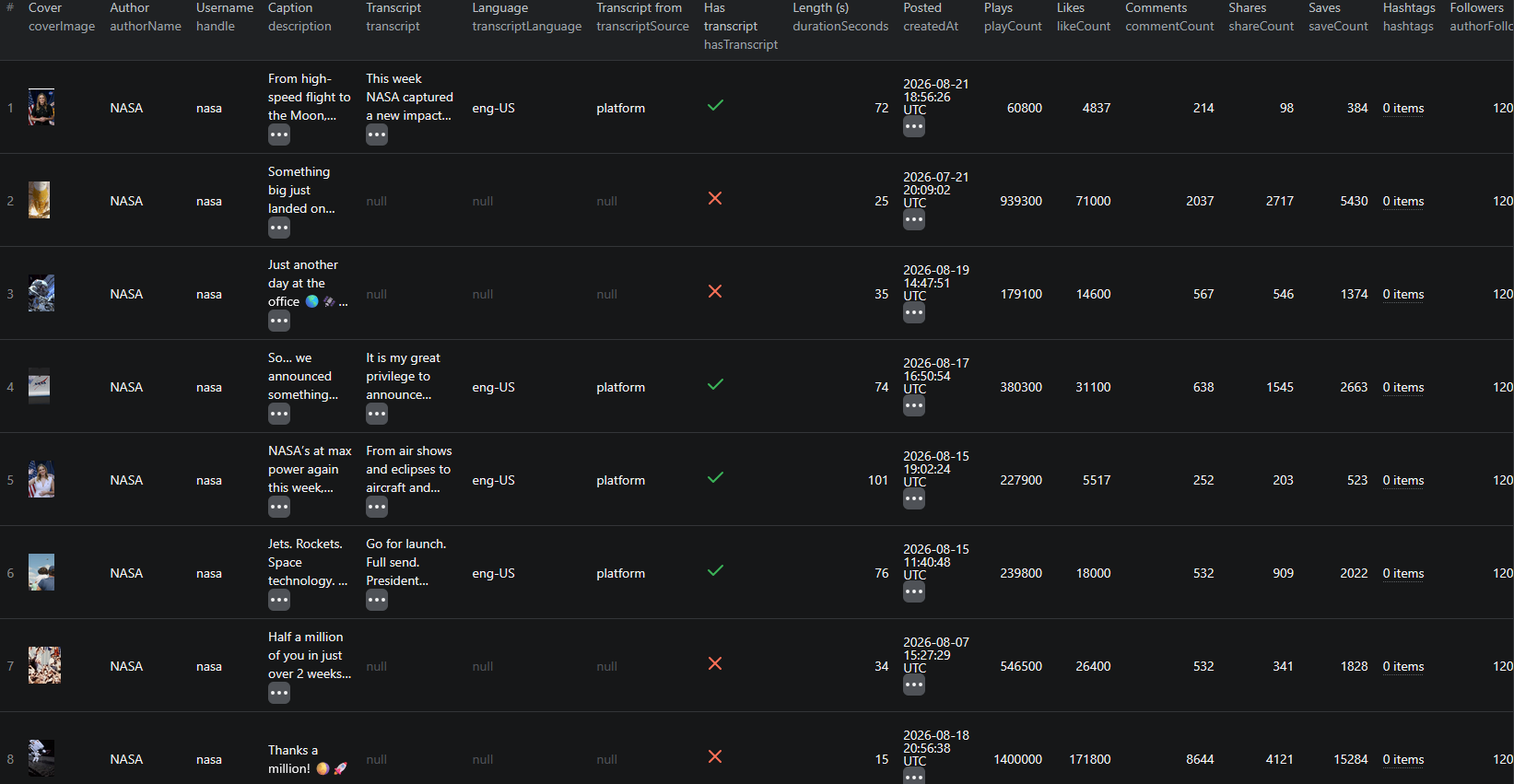
Each video comes back as one structured record — the transcript plus everything that gives it context.
| Field | Description | Example |
|---|---|---|
| id / url / handle | Video identifier, direct link and the account it belongs to | 7675043918240582925 |
| description / hashtags | The caption, and the hashtags pulled out of it | So… we announced something pretty big 👀 |
| createdAt / durationSeconds | Publish timestamp and clip length | 2026-08-17T16:50:54Z / 74 |
| coverImage | Cover frame of the video | p19-common-sign.tiktokcdn-eu.com/… |
| authorName / authorVerified | Who posted it and whether the account is verified | NASA / true |
| authorFollowers / authorBio | Audience size at scrape time, and the profile bio | 1,200,000 |
| playCount / likeCount | Views and likes | 380,200 / 31,100 |
| commentCount / shareCount / saveCount | The rest of the engagement signal | 638 / 1,545 / 2,663 |
| musicTitle / musicAuthor / musicIsOriginal | The sound used, and whether it is the creator's own | original sound / NASA / true |
| transcript | Full spoken text as one block | It is my great privilege to announce today… |
| transcriptCues | The same text split into cues with start and end seconds | start 0.46 → end 3.76 |
| transcriptLanguage / transcriptSource | Language spoken, and whether the text came from the platform or AI | eng-US / platform |
| hasTranscript / skippedReason | Whether text was found, and in plain words why it wasn't | false / "no spoken audio" |
The pairing is what makes this useful. A transcript on its own is a wall of text. A transcript attached to a play count, a like count, a save count, a publish date and the sound it used is a data point you can rank, filter and correlate.
Cues, not just a blob
transcriptCues splits the transcript into { text, start, end } entries. That is the difference between "we have the words" and "we can act on the words":
- Jump straight to the second a specific claim is made
- Cut clips programmatically around a quote
- Generate subtitle files
- Chunk sensibly for embedding — timestamped boundaries beat arbitrary character windows for RAG quality
TikTok cues are short, often a single clause. Merging them into 20–30 second windows before embedding usually gives better retrieval than using them raw.
Common Use Cases for TikTok Transcript Data
Hook Mining
The first three seconds decide whether a TikTok is watched, and on this platform the hook is almost always spoken rather than written. Pull the top accounts in a niche, take the first cue of each transcript, and correlate it against engagement rate. You end up with a catalogue of opening lines ranked by what they actually achieved — the most copied and least documented part of the format, finally in a spreadsheet.
Competitor and Brand Monitoring
Run the scraper against a competitor's account on a schedule. Within a month you have a corpus of everything they have said on camera: product claims, pricing language, the objections they keep pre-empting. Search it for your own brand name and you catch every mention that only ever happened out loud.
Pair this with TikTok Shop product data when the videos you are tracking sell something.
Trend and Language Tracking
Run the same account list weekly and track term frequency over time. When a phrase — a category name, an ingredient, a competitor, a compliance deadline — starts appearing in spoken content across a niche, you have caught a narrative shift while it is still forming. Captions lag speech by weeks.
AI Pipelines and RAG
Transcripts are near-ideal LLM input: conversational, opinionated, dated, and attributable. Embed the cues, keep url, handle and createdAt as metadata, and you have a queryable index of what an audience is being told — with a citation, and a timestamp to link back to.
Repurposing Your Own Content
Point it at your own account. Every video you have posted becomes a blog draft, a newsletter section, a set of pull-quotes and a subtitle track. The most efficient content you can produce is content you already made.
Sound and Format Analysis
musicIsOriginal separates talking-head content from trend-audio content, and durationSeconds separates the 15-second format from the two-minute one. Group transcripts by both and you can answer whether long-form explainers beat short hooks for a specific account — a question usually settled by vibes.
Challenges of Doing This Manually
Before the tutorial, it is worth being clear about why this is awkward to build in-house:
- The caption track is there but unexposed — TikTok generates it, serves it to the player and offers no way to read it. Finding and parsing it correctly is the whole trick, and getting it wrong means paying for speech-to-text you did not need
- A third of videos need real transcription — which means resolving the media file, downloading audio and running it through a speech-to-text model, with all the cost control that implies
- Media URLs need the page's own session — TikTok's video files reject a bare fetch; they only work with the cookies the detail page issued
- Rate limits punish parallelism, not volume — TikTok tolerates a lot of sequential requests and very little concurrency. A naive scraper that fires ten requests at once burns its IP within a minute
- Photo posts look like videos until they don't — a meaningful share of a feed is image carousels with no audio at all, and a naive pipeline pays for every one of them
- Discovery is capped — the public surface lists roughly a dozen recent videos per account, so any real archive has to be accumulated over time rather than fetched at once
- Maintenance — TikTok's frontend payload changes regularly, and each change breaks an unmaintained scraper
For most teams, a maintained actor is more practical than owning that stack.
Step-by-Step: How to Scrape TikTok Video Transcripts
Here is how to do it using the TikTok Video Transcript Scraper on Apify.
Step 1 — Choose Your Input
The scraper takes two kinds of input, and you can mix them in one run:
- Usernames —
nasa,@bbc, or a full profile URL. The account's recent videos are collected automatically and every one with speech is transcribed. This is the monitoring path - Video URLs — full TikTok video links, for when you already know exactly which videos you want, including older ones beyond the account's recent window
Step 2 — Configure the Run
Head to the TikTok Video Transcript Scraper and set your options:
- Add accounts to
usernamesand/or links tovideoUrls - Set
onlyPostsNewerThan—7 daysor2026-08-01— so a scheduled run only returns what is new - Set
maxResultsto cap the number of videos returned (default50) — this is your cost control - Leave
transcribeWithAIoff for a first pass. Most videos with speech already carry a transcript, and those cost nothing extra - Turn
transcribeWithAIon when you need maximum coverage — it takes you from roughly 2 in 3 to about 9 in 10, billed per started minute - Leave
languageon automatic unless AI transcription is misreading a specific accent
Example input for monitoring an account:
{
"usernames": ["nasa"],
"onlyPostsNewerThan": "7 days",
"transcribeWithAI": false,
"language": "auto",
"maxResults": 50
}
And for transcribing a specific set of videos with full coverage:
{
"videoUrls": [
"https://www.tiktok.com/@nasa/video/7675043918240582925"
],
"transcribeWithAI": true,
"language": "auto",
"maxResults": 10
}
Step 3 — Run the Scraper
Once started, the actor will:
- Resolve each username into its recent videos, newest first
- Skip photo posts, unavailable videos and anything older than your date filter
- Read the platform's own caption track wherever one exists
- Run AI transcription on the remainder, if you enabled it
- Split the result into timestamped cues and detect the spoken language
- Attach the full post context — caption, hashtags, author, followers, sound, all five engagement counts
- Explain every empty row through
skippedReason - Stop cleanly at your
maxResultscap
Step 4 — Export Your Results
- JSON — the right choice here, since
transcriptCuesandhashtagsare nested arrays - CSV / Excel — fine if you only need the flat transcript text and video metadata
- API — pull results programmatically via the Apify API
- Integrations — push straight to Google Sheets, Make, Zapier, or Slack
Ready to try it? Run the TikTok Video Transcript Scraper on Apify and get your first transcripts in minutes.
Example Output (Real Data Preview)

Here is a real record, trimmed for length:
{
"id": "7675043918240582925",
"url": "https://www.tiktok.com/@nasa/video/7675043918240582925",
"handle": "nasa",
"description": "So… we announced something pretty big 👀 It's called MAX POWER for a reason 🇺🇸✈️🚀 Join us November 7-8.",
"hashtags": [],
"createdAt": "2026-08-17T16:50:54.000Z",
"durationSeconds": 74,
"coverImage": "https://p19-common-sign.tiktokcdn-eu.com/tos-useast5-p-0068-tx/...",
"authorId": "7664638705177150477",
"authorName": "NASA",
"authorVerified": true,
"authorFollowers": 1200000,
"authorBio": "Making the seemingly impossible, possible.✨",
"playCount": 380200,
"likeCount": 31100,
"commentCount": 638,
"shareCount": 1545,
"saveCount": 2663,
"musicTitle": "original sound",
"musicAuthor": "NASA",
"musicIsOriginal": true,
"detectedLanguage": "eng-US",
"hasTranscript": true,
"transcriptSource": "platform",
"transcriptLanguage": "eng-US",
"transcript": "It is my great privilege to announce today. Max Power. Go for launch. All set. November 7th and November 8th. NASA is bringing a showcase of American technological leadership across air and space back to US soil...",
"transcriptCues": [
{ "start": 0.46, "end": 3.76, "text": "It is my great privilege to announce today." },
{ "start": 4.02, "end": 5.0, "text": "Max Power." }
],
"skippedReason": null
}
Key things to notice:
- The transcript is many times longer than the caption — the caption here is a one-line tease with three emoji; the spoken content is roughly 200 words of announcement. That ratio is typical, and it is the whole reason this dataset exists
transcriptSourcetells you what you paid for —platformmeans TikTok's own caption track, which costs nothing beyond the transcript event however long the video is.aimeans the per-minute fallback ran- Empty rows explain themselves — a video with no speech returns
hasTranscript: falseand askippedReasonin plain English, rather than a silent null you have to investigate - All five engagement counts are there — including
playCountandsaveCount, which TikTok exposes and most platforms do not. Saves are the strongest intent signal on the platform authorFollowersis a point-in-time snapshot — useful for weighting reach, but it is the value at scrape time, not at post time- Transcripts are near-verbatim, not perfect — proper nouns are where both TikTok's captions and AI models slip. Check the source video before quoting a name publicly
Try the TikTok Video Transcript Scraper now — no coding required.
Automating TikTok Transcript Collection
Scheduled Runs
This actor is designed for monitoring, not backfilling. Around 12 recent videos are reachable per account, so the way to build a deep archive is to run weekly against a fixed account list with onlyPostsNewerThan: 7 days and let it accumulate. A year of weekly runs gives you a corpus nobody can reconstruct after the fact — TikTok does not let you page back through it later.
Deduplicate on id and you will never store or pay for the same video twice.
API Integration
Use the Apify API to trigger runs and collect results programmatically:
- Push transcripts into a vector database for semantic search
- Summarize each new video with an LLM and post the summary to Slack
- Append rows to a competitor-messaging sheet automatically
- Alert when a tracked phrase or your brand name is spoken in a niche
Node.js Example
For a complete working example showing how to call this actor from Node.js — including coverage stats, engagement-rate ranking and turning transcriptCues into ready-to-embed chunks — see the GitHub repository.
Webhooks
Fire a webhook on run completion so summarization, embedding and alerting kick off the moment new transcripts land.
Using TikTok Transcript Data for Business Intelligence
Hook Performance at Scale
Take the first cue of every transcript, cluster the openings by type — question, claim, number, story — and compare average engagement rate per cluster. This is the single highest-value thing you can do with the dataset, and it is impossible without transcripts because the hook is never written down.
Claim Extraction
Run an LLM over each transcript with a fixed extraction schema — product claims, brand names, prices quoted, competitors mentioned. You end up with a structured claims table built from unstructured speech, which is exactly the kind of dataset competitive intelligence teams normally assemble by hand.
Engagement Correlation
Join transcript features against playCount, likeCount, shareCount and saveCount. Does word count per second correlate with completion-driven reach? Does mentioning a price in the first ten seconds move saves? These are answerable questions once video is text, and unanswerable before.
Multilingual Coverage
Transcripts come back in whatever was spoken — English, Japanese, Russian, Spanish, Arabic, French, German and more, detected automatically. One run over a regional account list gives you comparable text for markets you do not staff. Translate downstream and the analysis is identical to your home market's.
Content Gap Analysis
Compare the topic distribution of your own transcripts against the top accounts in your niche. Topics they cover repeatedly and you never mention are your content gaps, quantified rather than guessed.
Does TikTok Provide an API for This?
Not for this. TikTok's Display API only returns content for accounts that authorize your app — your own videos, essentially. The Research API is gated behind an application process largely limited to academic institutions in approved regions, and returns metadata, not spoken text. The Commercial Content API covers ads.
What's Available
- Official APIs exist for your own content and for approved research programs
- Approval is required, and access is granted per use case and per region
- No transcript, caption or speech-to-text surface exists in any of them
- No bulk export of another account's video content is offered
What That Means
Scraping is not an alternative to an API here — there is no API to be an alternative to. Everything the actor reads is rendered publicly for any visitor: the video, the caption, the author, the engagement counts and the caption track TikTok's own player uses. The optional AI transcription step happens on your side, from a public media file.
The TikTok Video Transcript Scraper reads that public surface and returns it as structured records with the transcript normalized into text and timestamped cues.
Pricing — Pay Only for Results
The actor uses Apify's Pay-Per-Event pricing model, so you pay for what you actually get back.
| Event | When it's charged | Price |
|---|---|---|
Actor start | Once per run | $0.001 |
video | Per video returned, with all its metadata | $0.003 |
transcript | Only when the video actually comes back with text | $0.005 |
transcript-minute | Per started minute, only when AI transcription is used | $0.020 |
Quick cost estimates:
- A video that comes back with a transcript → $0.008; one with no speech → $0.003
- 100 videos with transcripts on about two-thirds of them → roughly $0.63
- The same 100 videos with AI transcription switched on, taking coverage to about 9 in 10 → roughly $1.29
- A weekly monitor over 10 accounts, ~8 new videos each → about $0.50 per week
Three things keep the bill honest: photo posts and unavailable videos are skipped and never charged, a video with no speech is charged as a video and not as a transcript, and maxResults caps every run. New Apify accounts include free monthly usage credits, so you can validate the output before spending anything.
Try the TikTok Video Transcript Scraper
The TikTok Video Transcript Scraper turns TikTok's least accessible content type into structured text — full transcripts with timestamped cues and detected language, plus caption, hashtags, author, follower count, publish date, length, sound and all five engagement counts.
What you get:
- Full transcripts of public TikTok videos, from the platform's own caption track or from AI
- Timestamped cues — ready for clipping, subtitling or embedding
- Complete post context on every record, so transcripts are analyzable, not just readable
- Account monitoring — enter usernames, add a date filter, and a scheduled run returns only what is new
- Automatic language detection, with transcripts in whatever was spoken
- No login, no cookies, no session management
- Pay-Per-Event pricing — about $0.63 per 100 videos, and nothing for photo posts
- Scheduled runs, webhooks, and API access
Start transcribing TikTok videos now — your first run takes less than 5 minutes to set up.
Doing the same on other platforms? See how to scrape LinkedIn video transcripts and how to scrape X (Twitter) video transcripts, or work through the news and social media scraping guide for the wider picture.
Legal and Ethical Considerations
Video transcripts are people's words, so this dataset warrants more care than a product feed. Read this before building a pipeline.
- Public data only — the actor reads videos visible to any logged-out visitor. No login, no cookies, no private accounts
- Transcripts are personal data — an identifiable creator's spoken words, attached to their handle, are personal data under GDPR, UK GDPR, CCPA and similar regimes. You need a lawful basis to collect and process them
- Purpose matters — analyzing a brand's public messaging is a materially different purpose from building profiles of individual creators. The first is ordinary competitive research; the second attracts obligations you probably do not want
- Collect only what you need — if you are tracking topics and phrasing, you may not need handles at all. Aggregate analysis carries far less risk than a personal-data archive and usually answers the question just as well
- Build deletion in from day one — if someone asks to be removed from your dataset, you need to be able to do it. Retrofitting that is painful
- Transcripts are not verbatim-perfect — both TikTok's captions and AI models mishear names and jargon. Never quote a transcript publicly as an exact statement without checking the source video
- Respect the platform's terms — you are responsible for using the data in compliance with TikTok's Terms of Service and applicable law
- Do not republish wholesale — a transcript is a derivative of someone's creative work. Analysis, search and summarization are fair uses of your own copy; reposting full transcripts as content is not
Public content is fair to study. The person who spoke it still has rights over how you process their identity. Treating those two things differently is the whole of doing this responsibly.
Frequently Asked Questions
Can you get a transcript of a TikTok video?
Not from TikTok's own interface. TikTok generates captions for most videos with speech and shows them in the player, but there is no transcript view, no caption download and no public API that returns spoken text. The TikTok Video Transcript Scraper reads that caption track where it exists and runs AI speech-to-text on the videos that lack one, returning the full text plus timestamped cues alongside the post data.
Do I need a TikTok account or login to scrape transcripts?
No. The scraper reads only publicly visible videos, so there is no login, no cookie and nothing to configure. It sees what any logged-out visitor sees: public videos from public accounts.
How many videos can I get per TikTok account?
Around 12 recent videos per account. TikTok's public discovery surface stops there, so the actor is built to watch accounts over time rather than backfill an entire posting history — schedule it weekly and the archive builds itself. Older videos can still be transcribed by passing their URLs directly.
How much does it cost to transcribe TikTok videos?
The actor uses Pay-Per-Event pricing: $0.003 per video scraped and $0.005 per transcript returned, so a video that comes back with text costs $0.008. A run of 100 videos with transcripts on about two-thirds of them comes to roughly $0.63. AI transcription is optional and adds $0.020 per started minute, charged only for videos that have no transcript of their own.
Why do some TikTok videos come back without a transcript?
Either there was no speech to transcribe — dance, music and wordless comedy are a large share of the platform — or TikTok published no caption for it and AI transcription was left off. The skippedReason field says which in plain words, so an empty row explains itself.
Is scraping TikTok video content legal?
The scraper collects only publicly available data — no login, no private content. Video creators are identifiable individuals, though, so handles, profile data and the spoken content of their videos are personal data under GDPR and similar regimes. You need a lawful basis for collecting and processing them, and you remain responsible for complying with TikTok's Terms of Service and with copyright.
About the Author
This guide was written by Piotr, a software engineer with hands-on experience building and maintaining web scrapers at scale. He develops and maintains a suite of data extraction tools on the Apify platform, helping businesses automate their data collection workflows.
Need help with your scraping project?
Book a free discovery call and let's scope your project together.
Book a Call