How to Search Amazon by Image and Match Photos to ASINs
Matching a product photo to Amazon by keyword means guessing the words a seller used in the title. That works for branded items with a model number. It fails for furniture, fashion, home goods and most unbranded products, where the same thing is sold as "velvet loveseat", "mid-century sofa" and "cloud couch" by different sellers.
Our Amazon Image Search Scraper uses Amazon's own photo search. You give it image URLs and pick a marketplace. It returns the matching products with ASIN, URL, title, brand, price, list price, rating, review count, availability, a match score, and the item Amazon detected in your photo.
Amazon decides how many matches to show, typically 10 to 60 per photo, and there are no further pages. This is a tool for finding the closest products to a picture, not for pulling a whole category.
What you need before the first run
- An Apify account. No Amazon account or API key is needed.
- Direct image URLs, JPEG or PNG, up to 5 MB each. Most image CDN links that can serve several formats are fetched as JPEG for you. A URL that only serves WebP, GIF or AVIF will not work. Data URLs are accepted through the API.
- The marketplace you care about:
amazon.com,amazon.co.uk,amazon.de,amazon.it,amazon.esoramazon.in. Prices are returned in that store's currency.
Product shots, screenshots, outfit photos and room photos all work. Amazon detects each item it recognizes in the picture and matches every one of them, so one outfit photo can return shoes, a bag and a jacket.
Run a search with two photos
- Open the Actor on Apify and click Try for free.
- Add your photos under Image URLs.
- Choose the Amazon marketplace.
- Keep Max results per image at
50. - Click Start and open the results when the run succeeds.
We used two public Unsplash photos for our example run, a red running shoe and a green velvet sofa:
{
  "imageUrls": [
    "https://images.unsplash.com/photo-1542291026-7eec264c27ff?w=800",
    "https://images.unsplash.com/photo-1555041469-a586c61ea9bc?w=800"
  ],
  "marketplace": "amazon.com",
  "maxResultsPerImage": 50,
  "proxyConfiguration": {
    "useApifyProxy": true
  }
}
The run took about seven seconds and saved 40 products: 13 for the shoe photo, detected as shoes / fashion_sneaker, and 27 for the sofa photo, detected as sofa / sofas-couches. Both photos stayed under the limit of 50 because Amazon showed fewer matches.
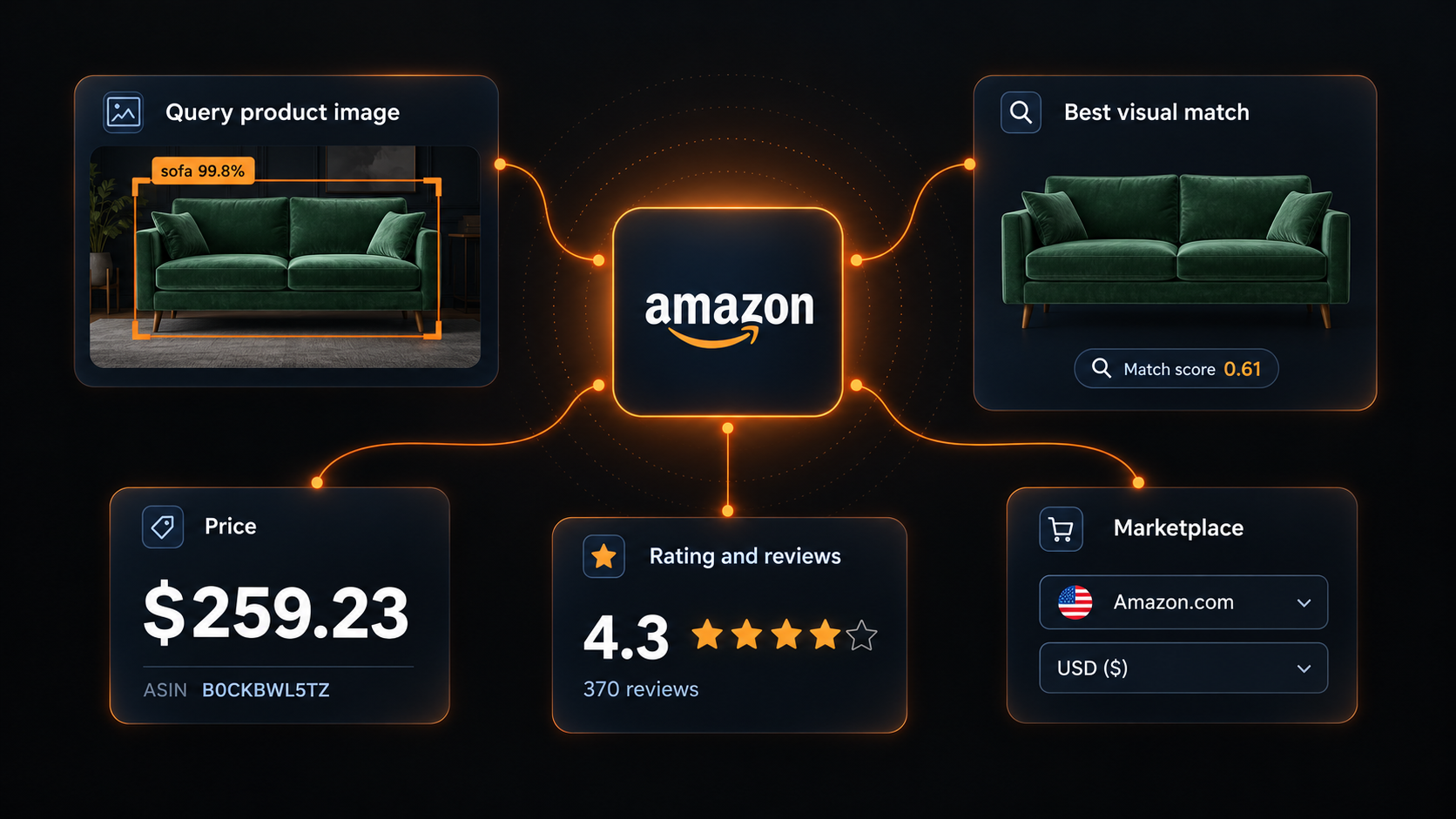
The top match for the sofa photo, abbreviated:
{
  "searchImage": "https://images.unsplash.com/photo-1555041469-a586c61ea9bc?w=800",
  "position": 1,
  "asin": "B0CKBWL5TZ",
  "url": "https://www.amazon.com/dp/B0CKBWL5TZ",
  "title": "Container Furniture Direct Kent Velvet Sofa for Modern Living Room...",
  "brand": "Container Furniture Direct",
  "price": 259.23,
  "listPrice": null,
  "currency": "USD",
  "rating": null,
  "reviewCount": null,
  "availability": "IN_STOCK_SCARCE",
  "productGroup": "furniture",
  "matchScore": 0.6148632,
  "detectedObject": {
    "label": "sofa",
    "fineLabel": "sofas-couches",
    "confidence": 0.9977,
    "box": { "x": 81, "y": 198, "width": 642, "height": 250, "imageWidth": 800, "imageHeight": 533 }
  },
  "marketplace": "amazon.com"
}
| Field | What it tells you |
|---|---|
searchImage, position, matchScore | Which photo found the product, its rank, and Amazon's similarity score. Higher is closer. |
asin, url, title, brand | The product identity. The ASIN is the key you join on and pass to other Amazon tools. |
price, listPrice, currency | The current price and, when Amazon shows a crossed-out price, the list price. In the store's currency. |
rating, reviewCount | Star rating and number of reviews. Empty for products without reviews. |
availability, variationCount, colorCount | Stock status and how many variations and colors the listing has. |
detectedObject | The item Amazon recognized in your photo, its confidence, and the pixel box where it sits. |
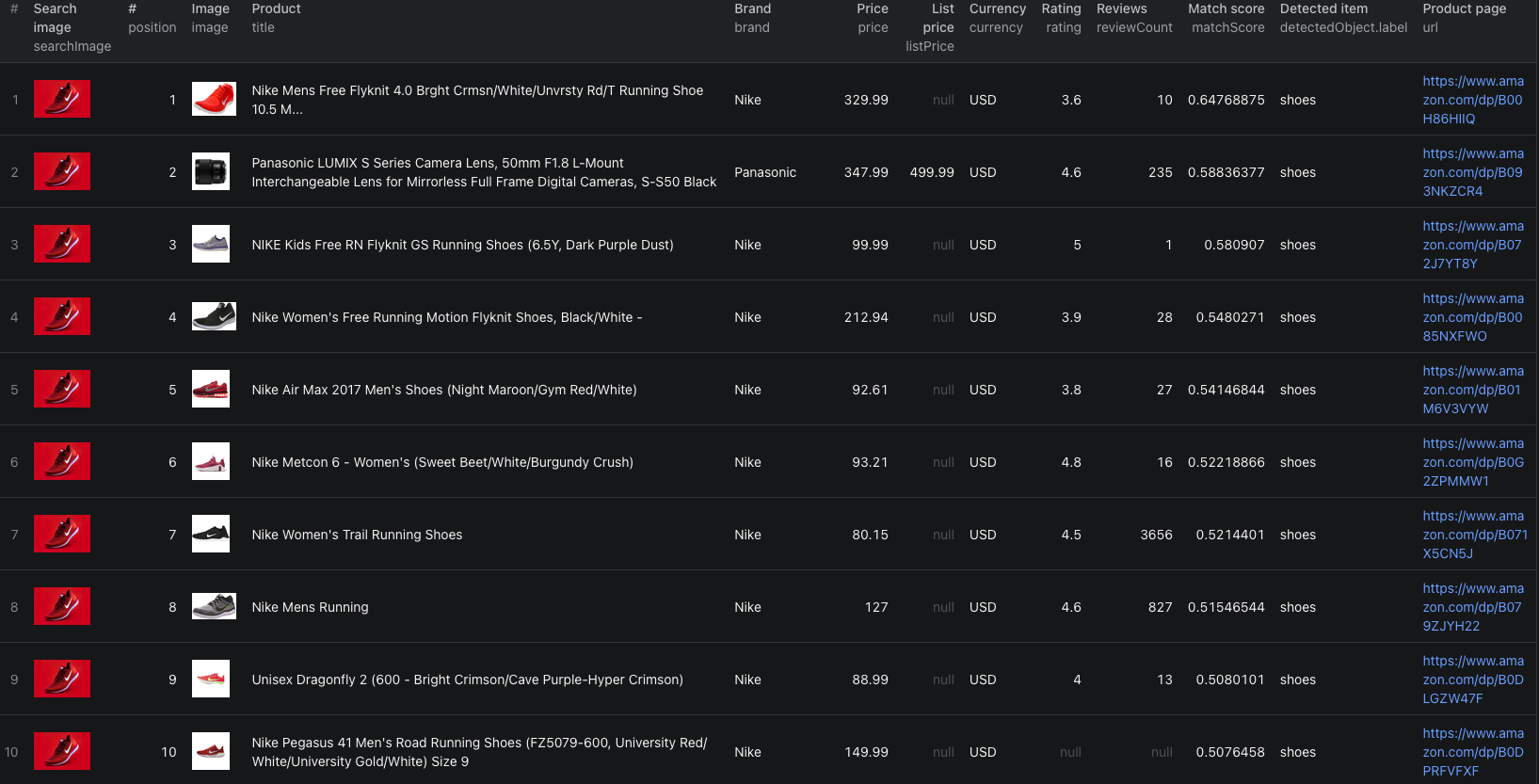
The Amazon image-search Node.js example runs the same two-photo search with apify-client and retrieves all 40 dataset rows.
Turn the matches into a shortlist
A high rank is a visual judgment, not a product match. Our example shows why.
In the shoe search, position 2 was a Panasonic camera lens. Every other result was a Nike shoe, but they ranged from a $75 women's running shoe to a $330 listing for an older Flyknit model. In the sofa search, the 27 matches included full sofas, loveseats, futon sofa beds and one velvet couch cover. Prices ran from $79.85 to $769, with a median of $310.86.
To get from that to something you can act on:
- Group rows by
searchImage, then bydetectedObject.labelif a photo contains several items. - Drop rows whose
titleorproductGroupdoes not match the category, such as the camera lens. - Remove adjacent products you do not want to compare against, like covers, accessories and different sizes. The title usually tells you.
- Treat rows without a
ratingwith care. Ten of our 40 products had no reviews yet. - Open the remaining product pages before you rely on dimensions, materials or the exact variant.
Once you have the ASINs you want, the Amazon Product & Buy Box Scraper can pull full product details and offers for them.
Search the same photos in another country
Run the same image URLs with a different Amazon marketplace to compare what each store shows for a product. The matches themselves can differ between stores, not just the prices, so join on ASIN only where both stores list the same ASIN.
The Actor skips a product it has already saved for an earlier image in the same run. If you need complete results for every photo independently, run them separately.
Estimate cost
Pricing as of October 10, 2026:
| Event | Price |
|---|---|
| Actor start | $0.00005 per run |
| Image search | $0.01 per photo that returned matching products |
| Product listing | $0.001 per product saved |
The events add up. Our two-photo example costs 2 × $0.01 + 40 × $0.001 = $0.06 in event charges. A batch of 100 photos with around 30 products each comes to about $4.00. Photos that fail to load or match nothing are not charged. Use Max results per image to cap product charges, and set a maximum charge per run for large batches. Platform usage may be billed separately depending on your Apify plan, so check live pricing first.
When results look wrong
- The photo fails to load. Check that the URL opens the image itself, is JPEG or PNG, and is under 5 MB.
- No products come back. Amazon did not recognize a product in the photo. Crop to the item, use a plainer background, and avoid heavy text overlays.
- Fewer products than you asked for. That is normal. Amazon chooses how many matches to show, and there are no further pages.
- A product is missing for the second photo. It was already saved for an earlier photo in the same run.
- The wrong item in the photo was matched. Use a photo that shows only the item you care about, or filter by
detectedObject.label.
Related guides
Searching Amazon by photo pairs well with the supplier-side searches. The AliExpress image search guide and the 1688 image search guide show how to find the same product at source. For Amazon itself, see the Amazon Best Sellers guide.
Frequently asked questions
Which Amazon marketplaces are supported?
Amazon.com, Amazon.co.uk, Amazon.de, Amazon.it, Amazon.es and Amazon.in. Prices come back in that store's currency.
Why did my photo return fewer products than maxResultsPerImage?
Amazon decides how many matches it shows for a photo, usually 10 to 60, and there are no further pages. The limit is a ceiling, not a target.
Can I use WebP images?
Only JPEG and PNG are supported. Image CDN links that can serve several formats are fetched as JPEG automatically, but a URL that only serves WebP, GIF or AVIF will fail and is not charged.
Does a high match score mean the product is the same item?
No. The score measures visual similarity. Check the title, brand and product page before treating a match as the same product.